
EDB Adobe Admin
Participant
July 12, 2021
Answered

Force users to sign using company address

  • July 12, 2021
  • 1 reply
  • 415 views

We currently have a department that issues documents to be digitally signed through Adobe Sign. Some signers have Adobe Sign license through their personal email/account.

We would like to restrict their access and sign these documents through their work email address.

According to the below article it seems that it is possible (unless I misunderstood):

https://helpx.adobe.com/sign/using/admin-guide.html#brWelcometoAdobeSign


My questions are:

  1. Is it possible? The article wasn't very clear to me.
  2. If possible, which type of license do I need to have?
  3. If possible, would we be required to purchase Adobe Sign licenses for all users (who will be signing)?
This topic has been closed for replies.
Correct answer One each Scott

Greetings!!

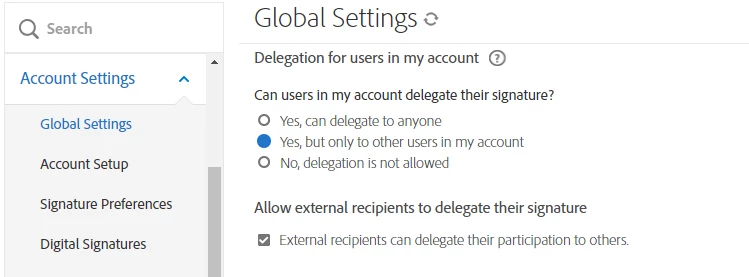
Adobe Sign allows the option to disable delegation to external email addresses at the Account level (Global Settings) and Group level (Group Settings):


If your recipients (and by recipients, I mean the email address in the agreement) are part of your Adobe Sign account, they are "internal."

If the users are not part of the Adobe Sign account, they are "external."


By disabling delegation, the agreement recipient will not be allowed to delegate the agreement t to their non-work email. So as long as you are sending the agreement to the work email address, you should be able to control this behavior.


Delegation controls are available in the business and enterprise tiers of service.

The small business and individual tiers of service do not have access to delegation controls and permit recipient delegation.


Assuming you have a business or enterprise-tiered account, you do not need to buy any additional licensing.

I would recommend enabling Users in Multiple Groups so you can configure one group specifically to control these types of agreements and their delegation rules, allowing you to have a different set of delegation rules for any customer-bound agreements that would be more permissive.


I hope this is helpful!

-Scott

1 reply

One each ScottCorrect answer
Adobe Employee
July 12, 2021

Greetings!!

Adobe Sign allows the option to disable delegation to external email addresses at the Account level (Global Settings) and Group level (Group Settings):


If your recipients (and by recipients, I mean the email address in the agreement) are part of your Adobe Sign account, they are "internal."

If the users are not part of the Adobe Sign account, they are "external."


By disabling delegation, the agreement recipient will not be allowed to delegate the agreement t to their non-work email. So as long as you are sending the agreement to the work email address, you should be able to control this behavior.


Delegation controls are available in the business and enterprise tiers of service.

The small business and individual tiers of service do not have access to delegation controls and permit recipient delegation.


Assuming you have a business or enterprise-tiered account, you do not need to buy any additional licensing.

I would recommend enabling Users in Multiple Groups so you can configure one group specifically to control these types of agreements and their delegation rules, allowing you to have a different set of delegation rules for any customer-bound agreements that would be more permissive.


I hope this is helpful!

-Scott