Participant
August 28, 2018
Answered

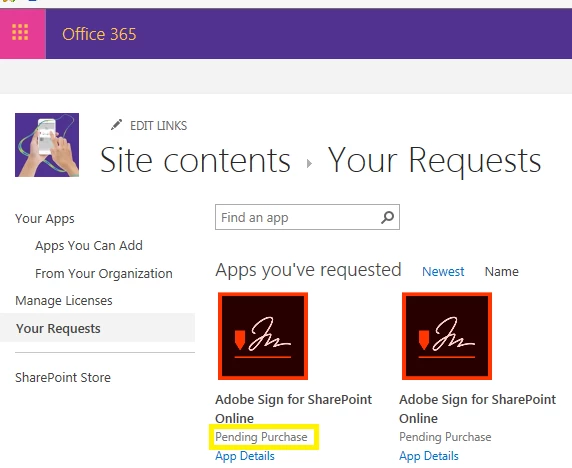
Free SharePoint Plugin is "Pending Purchase"

  • August 28, 2018
  • 1 reply
  • 1240 views

Hello community,

I want to add the free plugin “Adobe Sign for SharePoint Online”. Despite the fact that the plugin is free, I am told that my request is “pending purchase”:

I have an Adobe Sign Account, so this should not be the root cause. Can anyone tell me why I need to purchase a free plugin/why the plugin is not available instantly?

Kind regards,

Jan

This topic has been closed for replies.
Correct answer MarjanA

Dear Jan,

We believe you may not be able to install the Adobe Sign SharePoint Online application due to the assigned permission rights within SharePoint.

As a SharePoint site collection administrator, you'd require approval from the SharePoint Global Admin (sometimes referred to as a tenant admin or super admin) to download an app in SharePoint. In this case, when a site collection admin tries to download or install an Add-In, a request is initiated for the super admin to approve and until then, the status shows up as ''Pending Purchase.'' This is true when installing any add-in in SharePoint and not just Adobe Sign.

For step-by-step instructions for the Super Admin on how to either approve an App download request, or how to assign the necessary permissions to you to download applications in SharePoint, please go to: https://docs.microsoft.com/en-us/sharepoint/request-app-installation-permissions

We hope to have helped you get this resolved. If you find that you have any more questions, please don't hesitate to get back in touch.

Kind regards,

1 reply

MarjanACorrect answer
Participating Frequently
August 28, 2018

Dear Jan,

We believe you may not be able to install the Adobe Sign SharePoint Online application due to the assigned permission rights within SharePoint.

As a SharePoint site collection administrator, you'd require approval from the SharePoint Global Admin (sometimes referred to as a tenant admin or super admin) to download an app in SharePoint. In this case, when a site collection admin tries to download or install an Add-In, a request is initiated for the super admin to approve and until then, the status shows up as ''Pending Purchase.'' This is true when installing any add-in in SharePoint and not just Adobe Sign.

For step-by-step instructions for the Super Admin on how to either approve an App download request, or how to assign the necessary permissions to you to download applications in SharePoint, please go to: https://docs.microsoft.com/en-us/sharepoint/request-app-installation-permissions

We hope to have helped you get this resolved. If you find that you have any more questions, please don't hesitate to get back in touch.

Kind regards,