bvl80008358
Participant
February 4, 2016
Answered

Generating custom reports

  • February 4, 2016
  • 1 reply
  • 727 views

I want to generate a report for a date range that will include the following fields:

Name of signer

Email of signer

Name of document signed

Date signed

I need this for our metrics.

How can I do this?

This topic has been closed for replies.
Correct answer Anubha Goel

Hi BV Littlefield,

If you wish to generate an audit report for a particular transaction, then please follow these steps:

  • Go to Manage page
  • Choose the desired document
  • Click on History tab on the right side of the page
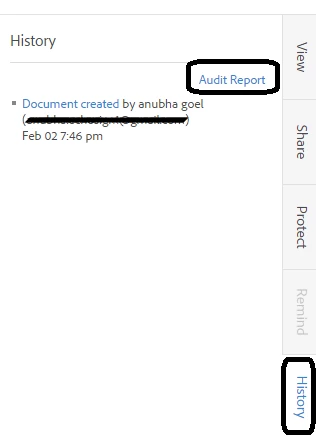
  • Then, choose Audit Report to run the report (find screenshot below):

Let me know if you need further assistance.

Regards,

Anubha

1 reply

Anubha Goel
Anubha GoelCorrect answer
Participating Frequently
February 4, 2016

Hi BV Littlefield,

If you wish to generate an audit report for a particular transaction, then please follow these steps:

  • Go to Manage page
  • Choose the desired document
  • Click on History tab on the right side of the page
  • Then, choose Audit Report to run the report (find screenshot below):

Let me know if you need further assistance.

Regards,

Anubha