


fontlaura
Participating Frequently
July 28, 2016
Answered

glitching form fields

  • July 28, 2016
  • 1 reply
  • 699 views

I have issues with two form fields.

1. The signer info field for Name. It's unfillable and does not appear to be autofilling for this particular client either.

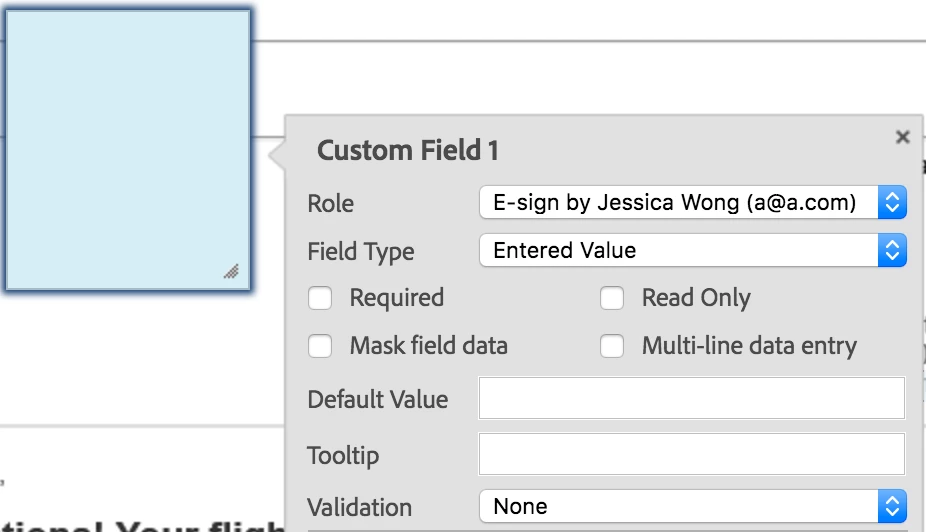
2. A large text box doesn't allow my client to fill it out with multiple lines. It just creates huge text. It makes no sense. How do I give them a large space in which to write their mailing address?

This of course creates the issue that if I have to cancel that contract and redo the form fields, I'll lose one of my allowed sends for the month. Certainly not preferable since it's the app's difficulties that may cause a need to resend. Very disappointing as well that I can't speak with ANYONE at Adobe when the program is behaving poorly.

This topic has been closed for replies.
Correct answer sameer_puri

Hi Laura,

I can help you with your queries here:

1. Signer Name should be auto-populated AFTER your client signs. He won't be able to see his name being auto-populated. But once he signs the document, you will see his name being auto populated in the signed agreement.

2. There is an option to enable multi line data entry if you double click on the text field on the authoring page. It looks like this:

You can always get in touch with our support team via email: support@echosign.com

Hope this helps!

Sameer Puri

1 reply

sameer_puri
Adobe Employee
sameer_puriCorrect answer
Adobe Employee
July 29, 2016

Hi Laura,

I can help you with your queries here:

1. Signer Name should be auto-populated AFTER your client signs. He won't be able to see his name being auto-populated. But once he signs the document, you will see his name being auto populated in the signed agreement.

2. There is an option to enable multi line data entry if you double click on the text field on the authoring page. It looks like this:

You can always get in touch with our support team via email: support@echosign.com

Hope this helps!

Sameer Puri

fontlaura
fontlauraAuthor
Participating Frequently
July 29, 2016

Thanks Sameer! This is very helpful. I had tried to email you in the first place but the page I found with a link to email just sent me to the forums when I clicked it. Glad to have the direct email address now. Thanks.
One last Q - is there a way to edit an unsigned contract without having to cancel, edit, and resend? I hate to keep sending my client new links and I don't want to use all my contract sends doing this dance to get the fields to behave properly.