westwayh45267207
Participant
November 25, 2015
Answered

How can I change the email in my profile?

  • November 25, 2015
  • 3 replies
  • 1773 views

I am trying to change the email in my profile, so that my documents are sent from a different email, however I don't seem to be able to do this?

    This topic has been closed for replies.
    Correct answer Anubha Goel

    Hi westwayh45267207,

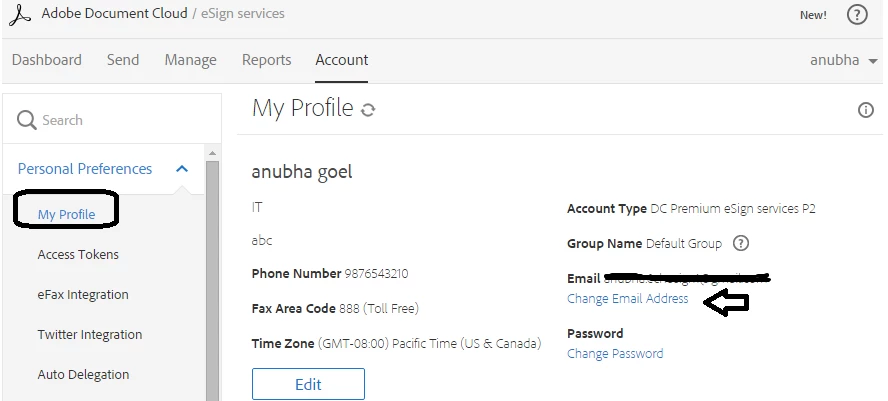
    Simply sign in to your eSign account and click on your name to open My Profile.

    Then, choose 'Personal Preferences > My Profile' and click at 'Change Email Address' option.

    Please note: The new email address that you choose should not be already registered with eSign account.

    Regards,

    Anubha

    3 replies

    Participant
    February 20, 2019

    I am having the same problem. No change email link as per the instructions. I there a fix for this issue. I really need to change the emai

    Thanks

    Meenakshi_Negi
    Legend
    February 28, 2019

    Hi Philb,

    Sorry for the delay in response.

    I have checked that you are using the Adobe ID for your Adobe Sign account.

    As you need to change the email address linked to your Adobe Sign account, you have to change your Adobe ID in that case.

    Changing the Adobe ID will automatically change the email address for your Adobe Sign account.

    Please make sure that the new email address (that you wish to use for your Adobe Sign account) is not used for any other registered Adobe Sign account.

    To change the email address, please refer to the steps mentioned under "Profile, ID & Password" > Update profile and email > Change email address in this help document Account and membership help

    Hope the information helps.

    Let us know if you experience any issue or have any question.

    Regards,

    Meenakshi

    westwayh45267207
    Participant
    November 25, 2015

    Thank you, However, I am not being given the 'Change Email Address' option.

    Anubha Goel
    Participating Frequently
    November 25, 2015

    Hi westwayh45267207,

    Please let me know where exactly you have signed in.

    You need to sign in to your Esign account at "https://secure.echosign.com/public/login"

    Please share the screenshot how exactly does it appears.

    Regards,

    Anubha

    westwayh45267207
    Participant
    November 25, 2015

    Hi Anubha,

    I signed in using the link you provided and using my email<personal details removed by moderator>  and my password but I am still only able to change the password and edit intials, company job title and phone number. Not Email.

    Anubha Goel
    Anubha GoelCorrect answer
    Participating Frequently
    November 25, 2015

    Hi westwayh45267207,

    Simply sign in to your eSign account and click on your name to open My Profile.

    Then, choose 'Personal Preferences > My Profile' and click at 'Change Email Address' option.

    Please note: The new email address that you choose should not be already registered with eSign account.

    Regards,

    Anubha