chrisk45996670
Participant
March 23, 2018
Answered

How can I force the text field format to persist when using Send for Signature

  • March 23, 2018
  • 1 reply
  • 553 views

When using Send for Signature, any text field that has been formatted under the Text Field Properties loses the format when the document is sent for signature. (i.e. $999.40 becomes 999.4 )

This topic has been closed for replies.
Correct answer Meenakshi_Negi

Hi Chrisk,

Sorry for the delay in response.

As you need to keep the format stable for the text form field when sending the form for signature, please try to set the validation for that particular field.

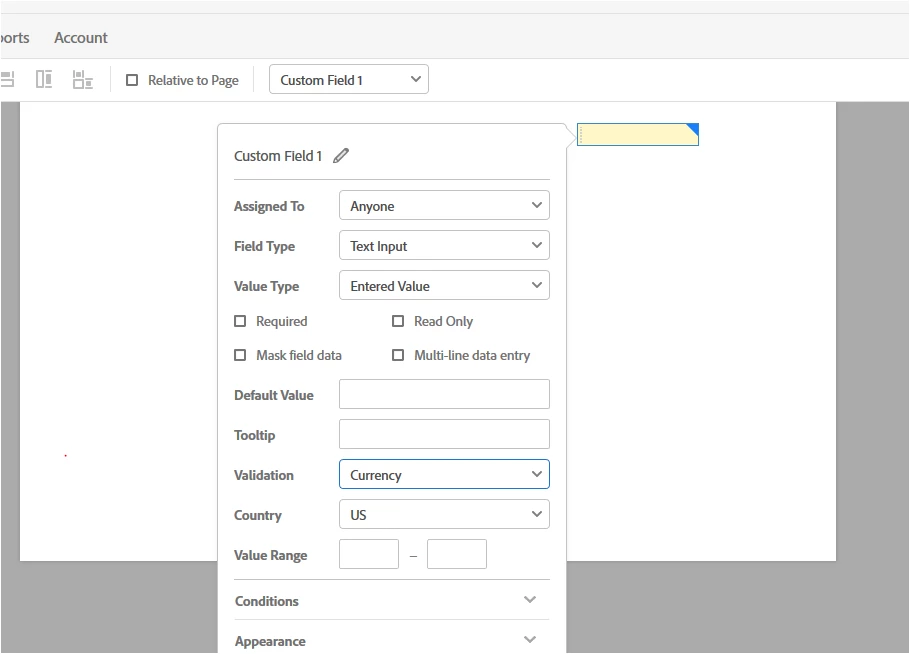
For example: if you have created a text field for adding the US currency, refer the steps shown below:

- Double click on the text form field to open the Text field properties box.

- Then select "Currency" from the drop-down of Validation.

- Select the Country and Value range if you wish to add any.

- Click "OK" at the bottom of that window.
Hope that answers your query.

Let us know if you have any question or you referring to something else.

Regards,

Meenakshi

1 reply

Meenakshi_Negi
Meenakshi_NegiCorrect answer
Legend
April 12, 2018

Hi Chrisk,

Sorry for the delay in response.

As you need to keep the format stable for the text form field when sending the form for signature, please try to set the validation for that particular field.

For example: if you have created a text field for adding the US currency, refer the steps shown below:

- Double click on the text form field to open the Text field properties box.

- Then select "Currency" from the drop-down of Validation.

- Select the Country and Value range if you wish to add any.

- Click "OK" at the bottom of that window.

Hope that answers your query.

Let us know if you have any question or you referring to something else.

Regards,

Meenakshi


