Participant
August 19, 2015
Answered

How can I sign a form before I send it to a customer to e-sign from the dashboard?

  • August 19, 2015
  • 1 reply
  • 709 views

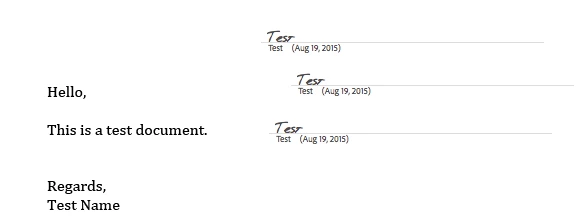
I am sending an application for a customer and I need to sign it in three locations prior to sending the document to be e-signed by a customer. Please help this would make my life a lot easier and save a ton in paper thanks.
    This topic has been closed for replies.
    Correct answer NakulB

    Hello,

    If you are planning  to sign the document first and request further signatures, please follow the steps mentioned below:-

    - Login to your eSign account

    - Go to send tab

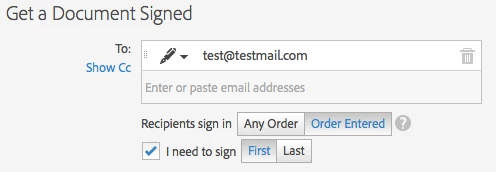
    - Type the email address of the recipient

    - Select I need to sign (Order entered-First)


    - Upload the document

    - Check Preview, position signatures or add form fields

      (If you like to position the signatures and form fields)

    - Click Next

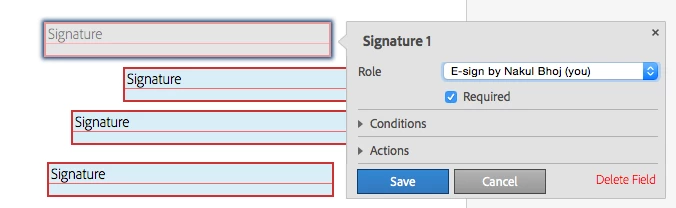
    - Place the signature fields

    - Change the signature field role to E-sign by you

    - Click Save- Next

    - Apply your signatures

    - Once you complete your signatures, document will be sent to the next signer

    Regards,

    Nakul

    1 reply

    NakulBCorrect answer
    Adobe Employee
    August 19, 2015

    Hello,

    If you are planning  to sign the document first and request further signatures, please follow the steps mentioned below:-

    - Login to your eSign account

    - Go to send tab

    - Type the email address of the recipient

    - Select I need to sign (Order entered-First)


    - Upload the document

    - Check Preview, position signatures or add form fields

      (If you like to position the signatures and form fields)

    - Click Next

    - Place the signature fields

    - Change the signature field role to E-sign by you

    - Click Save- Next

    - Apply your signatures

    - Once you complete your signatures, document will be sent to the next signer

    Regards,

    Nakul