


Participant
June 4, 2018
Answered

How can you adjust the email notifications to the signers/approvers etc.?

  • June 4, 2018
  • 2 replies
  • 1248 views

Hello,

When we are starting the signing process everyone of the recipients receive an email notification to sign the document. But on top of that, they also get an email, when they finished the signing process with the complete filled out PDF. Is there a possibility that they only receive the first notification?

Thank you already for your help.
    This topic has been closed for replies.
    Correct answer ScottCarter

    Greetings!

    For enterprise-level accounts, there are two options:

    1. Use custom workflows to define who gets what email based on the type of transaction you are sending. Workflows can really help customize an experience and give you the latitude to create the right email distribution based on the type of documents being sent.

    2. You can contact your success manager and have the "default" email settings configured at the Account or Group level.  This would apply the sending rules to every agreement that is sent from the Account/Group.

    **Be advised that suppressing email notifications at the Account or Group level is incompatible with a having a retention policy.

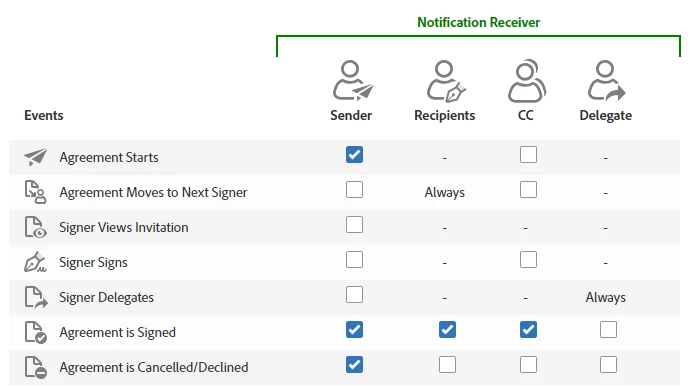
    The below chart gives you a good idea as to how emails can be configured:

    2 replies

    ScottCarterCorrect answer
    Participating Frequently
    June 12, 2018

    Greetings!

    For enterprise-level accounts, there are two options:

    1. Use custom workflows to define who gets what email based on the type of transaction you are sending. Workflows can really help customize an experience and give you the latitude to create the right email distribution based on the type of documents being sent.

    2. You can contact your success manager and have the "default" email settings configured at the Account or Group level.  This would apply the sending rules to every agreement that is sent from the Account/Group.

    **Be advised that suppressing email notifications at the Account or Group level is incompatible with a having a retention policy.

    The below chart gives you a good idea as to how emails can be configured:

    Participant
    June 4, 2018

    I noticed you can change this within your Account Settings.

    > Account

    > Shared Events

    > Click or Unclick the ones that you want to/not to trigger an event