


Participant
October 2, 2018
Answered

How do I maintain sent documents now?

  • October 2, 2018
  • 1 reply
  • 524 views

I send out many copies of the same document to be signed throughout our company. I can no longer tell who they have been sent to if I want to maintain certain documents, or if it needs to be removed, without clicking on each one to see who it has been sent to. And not being able to delete the documents sent for signatures and only cancel them adds to the on going list and makes finding documents even more cumbersome. This update is not user friendly at all. Its like it has been broken down to the most basic information and that is all we get to maintain our documents sent out for signatures.

    This topic has been closed for replies.
    Correct answer Meenakshi_Negi

    Hi Jessicad,

    Sorry for the delay in response.

    Our initial launch of the all-new Doc Cloud provides the functionality you've come to depend on, but thanks to your feedback, we realize that there is still room for improvement with the Sign experience. The requested changes are back.

    For detailed information, please refer to updated Adobe article New Send for Signature experience in Adobe Document Cloud

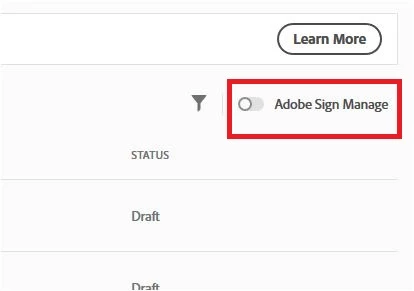
    You can now easily get to the Old Manage tab by toggling the radio button for Adobe Sign Manage.

    Check the screenshot below:

    There you can check to whom the documents have been sent for signature.

    All the options are available as it was before the update.

    Check if that works for you and let us know if you experience any issue.

    Hope that helps.

    Feel free to update the thread if you need any help.

    Regards,

    Meenakshi

    1 reply

    Meenakshi_Negi
    Meenakshi_NegiCorrect answer
    Legend
    December 3, 2018

    Hi Jessicad,

    Sorry for the delay in response.

    Our initial launch of the all-new Doc Cloud provides the functionality you've come to depend on, but thanks to your feedback, we realize that there is still room for improvement with the Sign experience. The requested changes are back.

    For detailed information, please refer to updated Adobe article New Send for Signature experience in Adobe Document Cloud

    You can now easily get to the Old Manage tab by toggling the radio button for Adobe Sign Manage.

    Check the screenshot below:

    There you can check to whom the documents have been sent for signature.

    All the options are available as it was before the update.

    Check if that works for you and let us know if you experience any issue.

    Hope that helps.

    Feel free to update the thread if you need any help.

    Regards,

    Meenakshi