Participant
September 21, 2018
Answered

How do I use radio buttons and formula for yes/no, more info questions

  • September 21, 2018
  • 2 replies
  • 8154 views

Good morning,

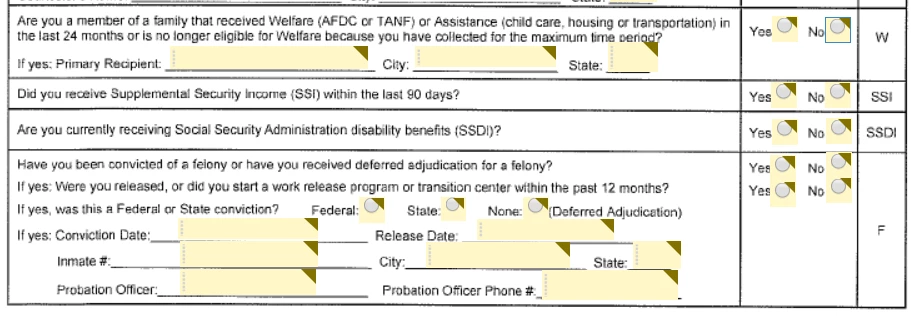
I am very new at Adobe Sign and have a form that I would like to create a formula that if No is checked, it moves to the next question. If Yes, then the sub-information needs to be completed. Below is a copy of part of a form I am trying to update.

I have been looking for an answer but cannot seem to find one that helps me achieve this. 

I appreciate hearing your recommendations. 

Thank you!!!

This topic has been closed for replies.
Correct answer ScottCarter

Greetings!

Let me start by informing you that the solution to this requires a business or enterprise service level.

If you are on a trial, you will have enterprise features for the trial.

If you subsequently purchase a team or individual level of service, this solution will no longer be available.

So, assuming that you are in a business or enterprise environment, the feature you want to use is the Conditions section of your text fields.  This feature allows you to make the text visible or hidden based on the value of another field.

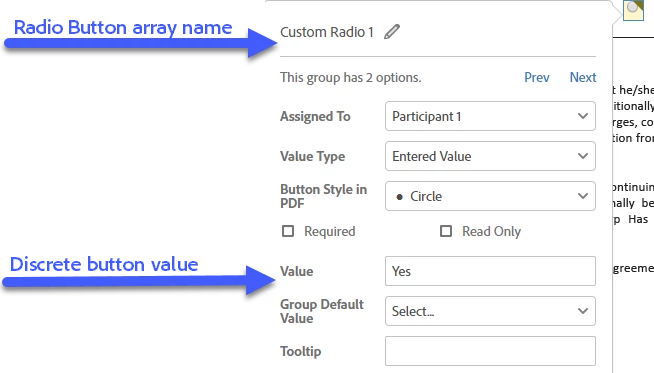
In your example above, the radio button array contains a unique value for each button in the array. The default is 0 and 1 in a two button array, but I renamed mine to Yes and No to match the form content. (and make reporting more consumable if you report on the document content)
Next, you want to edit the Text fields that are dependant on the yes/no choice.

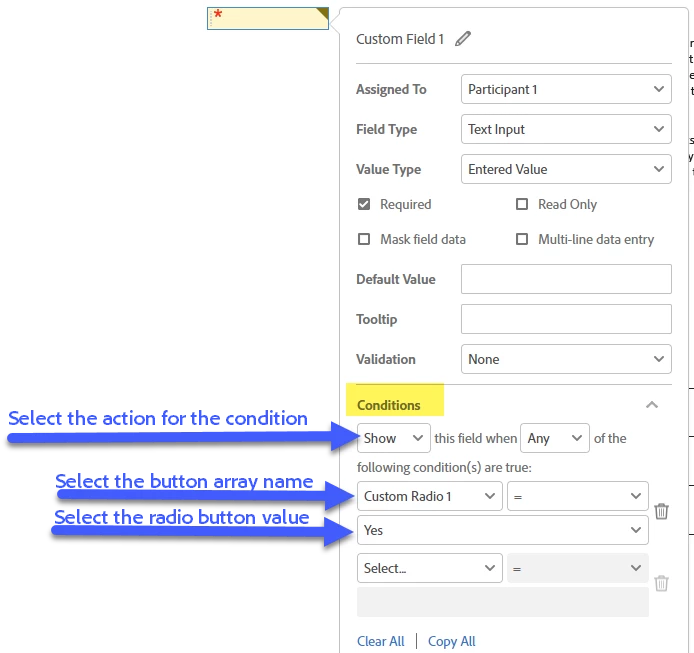
  • Open the text field properties, and expand the Conditions section.
  • Select an action for the field when the condition is met.  Generally, I recommend exposing fields based on conditions. (Having fields disappear can create confusion for the recipient.)
  • Select the name of the array of radio buttons
  • Select the value from the drop-down that matches your desired effect.
    • Conditions can be compound if you have complex needs, but in this case, it looks like a simple yes or no will do.

It would look something like this:
Save the field properties,

The result will be fields that only are shown (during the signing process) when the Custom Radio 1 array has the Yes button selected.

Feel free to use Required flags for conditional fields as they are only required when exposed.

2 replies

Riemem01Author
Participant
October 1, 2018

Thank you!  This is exactly what I was looking for.

ScottCarterCorrect answer
Participating Frequently
September 21, 2018

Greetings!

Let me start by informing you that the solution to this requires a business or enterprise service level.

If you are on a trial, you will have enterprise features for the trial.

If you subsequently purchase a team or individual level of service, this solution will no longer be available.

So, assuming that you are in a business or enterprise environment, the feature you want to use is the Conditions section of your text fields.  This feature allows you to make the text visible or hidden based on the value of another field.

In your example above, the radio button array contains a unique value for each button in the array. The default is 0 and 1 in a two button array, but I renamed mine to Yes and No to match the form content. (and make reporting more consumable if you report on the document content)

Next, you want to edit the Text fields that are dependant on the yes/no choice.

  • Open the text field properties, and expand the Conditions section.
  • Select an action for the field when the condition is met.  Generally, I recommend exposing fields based on conditions. (Having fields disappear can create confusion for the recipient.)
  • Select the name of the array of radio buttons
  • Select the value from the drop-down that matches your desired effect.
    • Conditions can be compound if you have complex needs, but in this case, it looks like a simple yes or no will do.

It would look something like this:

Save the field properties,

The result will be fields that only are shown (during the signing process) when the Custom Radio 1 array has the Yes button selected.

Feel free to use Required flags for conditional fields as they are only required when exposed.