Greetings!
Just to expand a little on the above, the Company field is a value that is "owned" by the Signer.
It's a property directly attributed to the Signer, and as such, only the Signer (as defined by the email address) can edit it.
Signers that have registered their email address can insert their company name into their user profile, and when this is the case, the Company value on the Manage page automatically populates with the user's profile value.
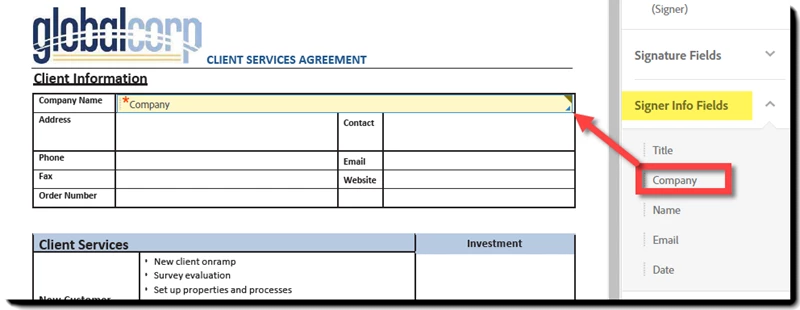
If the Signer has not registered their email address, you can include a "Company" field in your documents that will capture this value and populate the column in the Manage tab.
Because there is no way for you to know if a user is registered, explicitly adding a Company field (perhaps to the signature section) to all of your documents might be worthwhile.
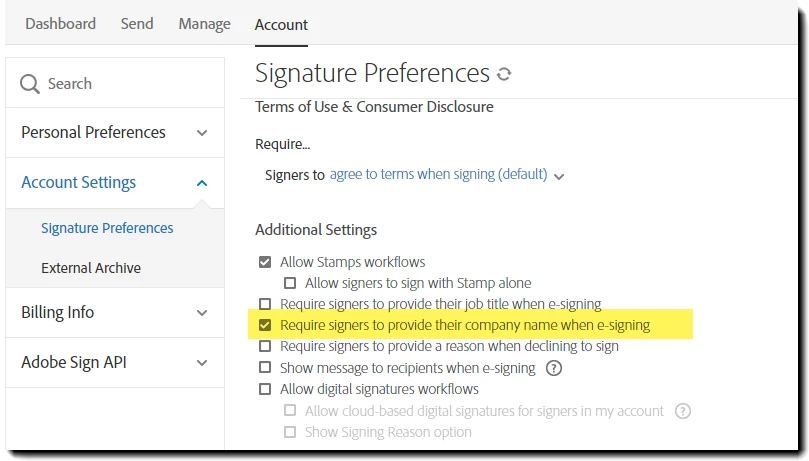
There is also a setting that will require all documents to have a Company field in the Account > Signature Preferences section (Account Admin access only).
This setting checks all sent agreements for a Company field, and if one is not found, a Signature Block, including the Company field, is applied to the bottom of the page. This isn't always desirable, so explicitly adding the field is generally recommended.




 AdChoices