Participant
December 20, 2016
Answered

How to add Document History to signed docs

  • December 20, 2016
  • 6 replies
  • 10872 views

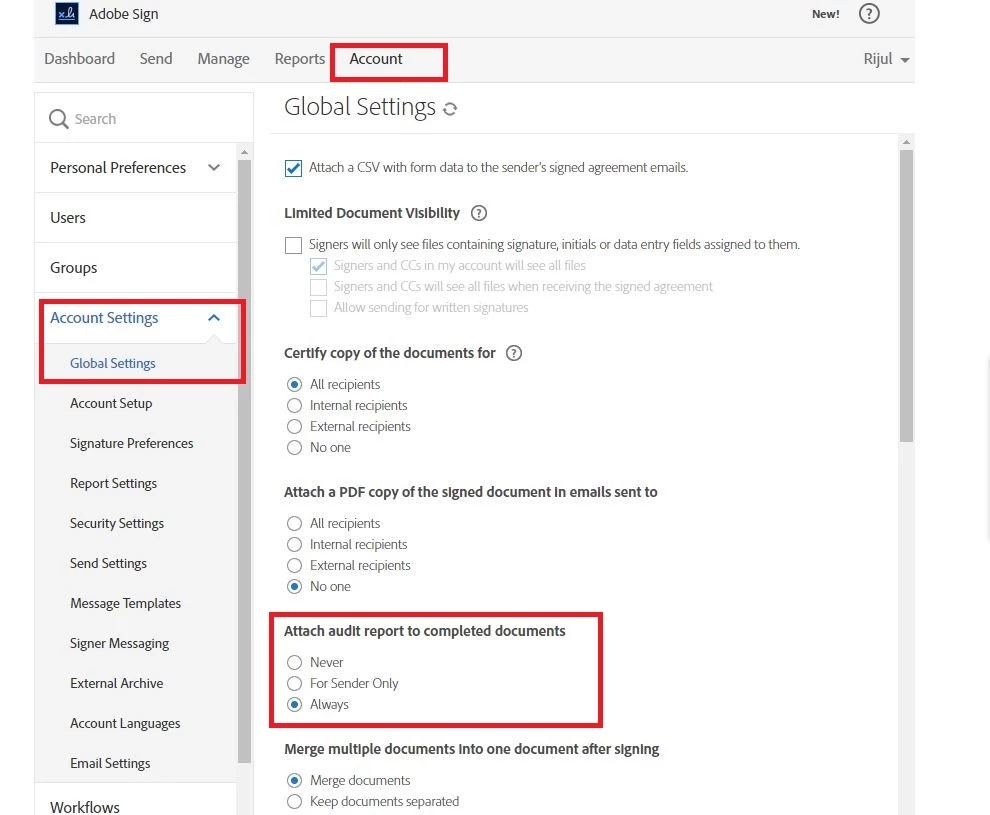
For executed contracts, I need to include the Document History validating the electronic signature.  I have a Business account and have selected the "Attached Audit Report to Completed Documents" button in the Global Settings tab.  The Document History is now sent as a separate .pdf file with the signed document.  To properly identify the signed document, I need the Document History to be included as the last page(s) of the .pdf file containing the signed document.  Can this be accomplished?

This topic is closed to new replies. Start a new post to keep the conversation going.
Correct answer AadeshSingh

Hi teresaj91022691​,

Please sure you have kept "Attach audit report to completed documents" to "Always".

Regards,
Aadesh

6 replies

AadeshSingh
AadeshSinghCorrect answer
Participating Frequently
December 21, 2016

Hi teresaj91022691​,

Please sure you have kept "Attach audit report to completed documents" to "Always".

Regards,
Aadesh

Participant
December 21, 2016

Thank you, Aadesh.  I have selected "Always" in this section but the Document History is sent as a separate document and not included in the signed document.  Is there another selection I need to make to have Document History be included as the last page(s) of the signed document?