Participant
October 15, 2025
Answered

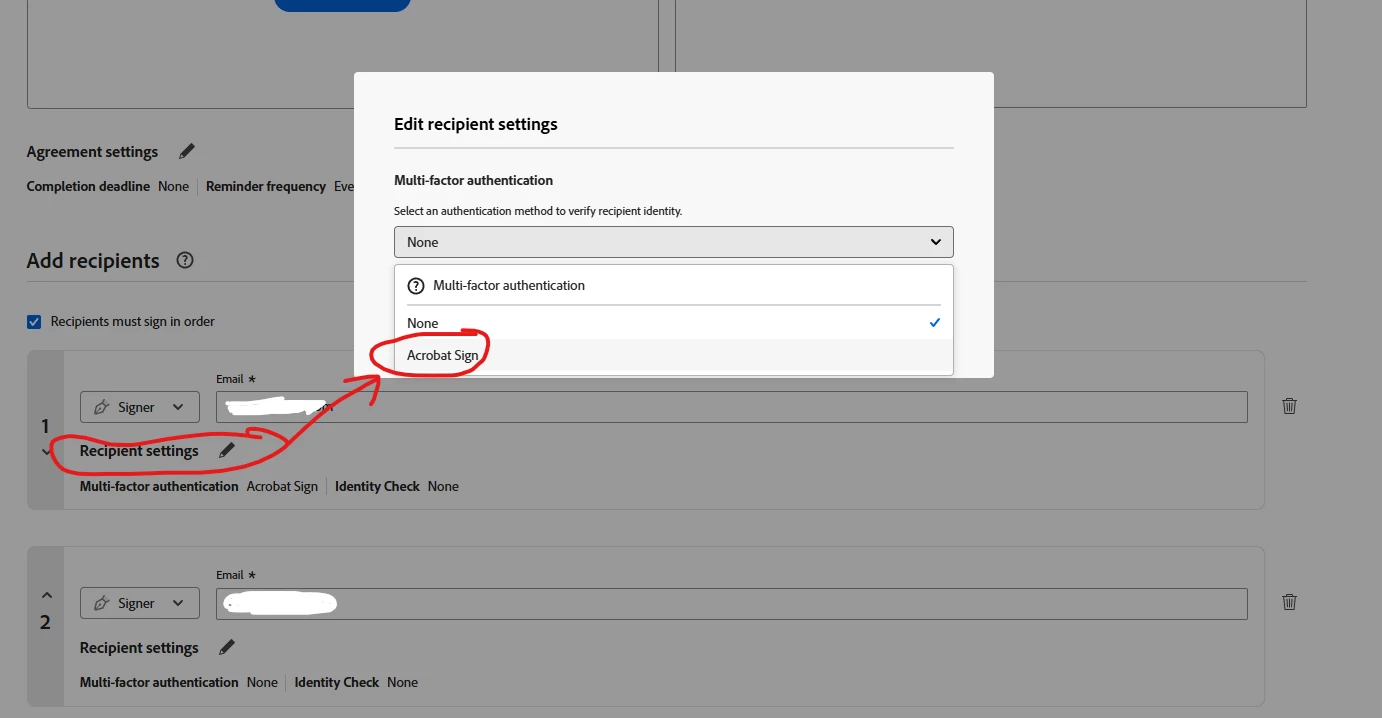
How to change Recipient settings to always as default choose "Adobe Sign"

  • October 15, 2025
  • 1 reply
  • 130 views

How to change default so when I want to create and have people to sign my documents, that by default recipient settings = Adobe sign


So stupid and tedious that I have to mouse click every time I have to create documents. Would just be a good service to users that I can chose this as a default settings.


Correct answer creative explorer

@Mr B is me Within the standard user interface of Acrobat Sign, there is no direct "Set as Default" button to permanently select Acrobat Sign. You could as a work-around is work with a custom template, a way to avoid repeating steps—especially for setting Acrobat Sign as the authentication method?!

Start a new send and set everything the way you want: upload the document, adjust agreement settings, and add a placeholder recipient. Set authentication for the placeholder to Acrobat Sign in the recipient settings. Save as a template instead of sending. Give it a clear name like “Standard Signature - Acrobat Sign Authentication” . Use the template next time you send. Just update the placeholder’s name and email—the authentication method will already be set. This way, you only configure it once, and reuse it every time—saving clicks and effort.

1 reply

creative explorer
Community Expert
creative explorerCommunity ExpertCorrect answer
Community Expert
October 16, 2025

@Mr B is me Within the standard user interface of Acrobat Sign, there is no direct "Set as Default" button to permanently select Acrobat Sign. You could as a work-around is work with a custom template, a way to avoid repeating steps—especially for setting Acrobat Sign as the authentication method?!

Start a new send and set everything the way you want: upload the document, adjust agreement settings, and add a placeholder recipient. Set authentication for the placeholder to Acrobat Sign in the recipient settings. Save as a template instead of sending. Give it a clear name like “Standard Signature - Acrobat Sign Authentication” . Use the template next time you send. Just update the placeholder’s name and email—the authentication method will already be set. This way, you only configure it once, and reuse it every time—saving clicks and effort.

m
Participant
October 16, 2025

Thank you for your constructive idea, I will try it out.