


Participant
Apr 7, 2017 6:43 PM UTC
Question

How to create if else statement in Adobe Sign

Hi,

I am trying to calculate a field in an Adobe sign form. The basic add, subtract, multiply, I am okay with.  However, when it comes to if, else statements I am a bit lost.

Here's an example of what I am trying calculate for field W-A:

If Intra-state-Airfare-Quote is greater than 0, move it to field W-A

else

Check if Out-of-State-Itinerary-1 is not blank, if not blank then move it to field W-A
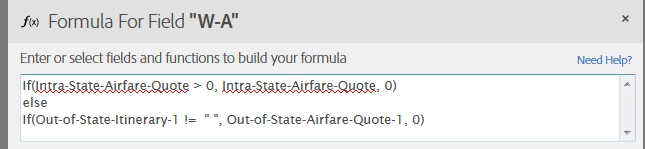
I know I am doing it wrong.  Your help is very much appreciated.

JZ

This topic is closed to new replies. Start a new post to keep the conversation going.

3 replies

AadeshSingh
Participating Frequently
Apr 16, 2017 5:53 AM UTC

Hi jianZ​

On the Preview page where you place the field on the document, double click on the field on which you want to set the calculated value.

Set "Field Type" to : Calculated Value -> On Formula Field click on "f(x)".

Now select the Function f(x) that you want to use on the field as show in the below window:

Regards,

Aadesh

Translate
jianZAuthor
Participant
Apr 18, 2017 1:19 AM UTC

Hi Aadesh,

Thanks for the info.  I tried to follow the function but received the following error when trying to save it:

Could you please tell me what I am missing in the above expression?

Thanks again.

JZ

Translate
AadeshSingh
Participating Frequently
Apr 23, 2017 5:29 AM UTC

Hi jianZ

Please make sure you are using the same field name from which you are fetching the value to compare using the condition operator.

Regards,

Aadesh

Translate