Participant
April 7, 2020
Answered

How to delete agreement in Adobe Sign?

  • April 7, 2020
  • 12 replies
  • 43390 views

I signed up for the trial version of Adobe Sign yesterday and tested how it would work to solve an issue with clients I can't currently meet face-to-face with because of COVID-19. It worked great. I sent a document from my (work) trial account to my personal email account, signed the document, and then opened the document in my (work) trial account. Super slick, I thought - this is going to be great! 


But now I can't find one single way to delete the signed (completed) agreement from within Adobe Sign and the document doesn't even appear anywhere in my Adobe Document Cloud. There are no options for deleting the document at all. I've contacted Adobe through chat and they have no solutions for this and have referred me to this page instead. I've read through past discussions and the solutions posted don't work - the screen options I get are not the same as in those solutions - perhaps because since those were posted the product has changed.


I would love help figuring out how to delete completed documents because it will be a necessary step each time I receive a signed document from a client. I don't want any of the signed documents stored in my account or on the cloud. I believe I should ultimately control that information and also should feel good about that. The documents I will be sending for signature will contain personal identifying information and I don't want them stored on the cloud.


Thanks in advance.

Correct answer Meenakshi Negi

I couldn't load that site either.

When calling the hotline they were telling me that individual accounts can not delete (!) agreements, but only "hide" them by opening them in the agreement overview --> https://acrobat.adobe.com/link/documents/agreements/#agreement_type=all 

on the right hand side click on the strike through eye symbol saying 'hide agreement'.

Then you can still access the file for some time by clicking on "filter" in the overview menu

https://acrobat.adobe.com/link/documents/agreements/#agreement_type=all  and "show hidden agreements". But they told me eventually it will be deleted then.

They also told me I would have to upgrade my account to company account in order to directly delete agreements.

What a drag!


Hi camillor87325755,


Thank you for reaching out.


As you wish to delete the document from the Adobe Acrobat Sign account, please use the steps suggested in the following help document:

1. Open the link: https://acrobat.adobe.com/link/home/

2. Sign in using the Adobe ID and password.

3. Then click on the Profile icon and select Settings.


4. Go to E-Sign settings and click on Edit settings.


5. Go to the Privacy tab and search the document using the email address used in the transaction.


6. Now select the document from the list and click on the trash icon next to it.

That will remove the document from the Acrobat Sign server permanently.


Let us know if you do not find any option or experience any issues.


Thanks,

Meenakshi

12 replies

Participant
March 7, 2024

I don't have the option "privacy" all I can do is to create a signature, this is killing me , any ideas? I really need to delete an agreement


Participant
January 24, 2024

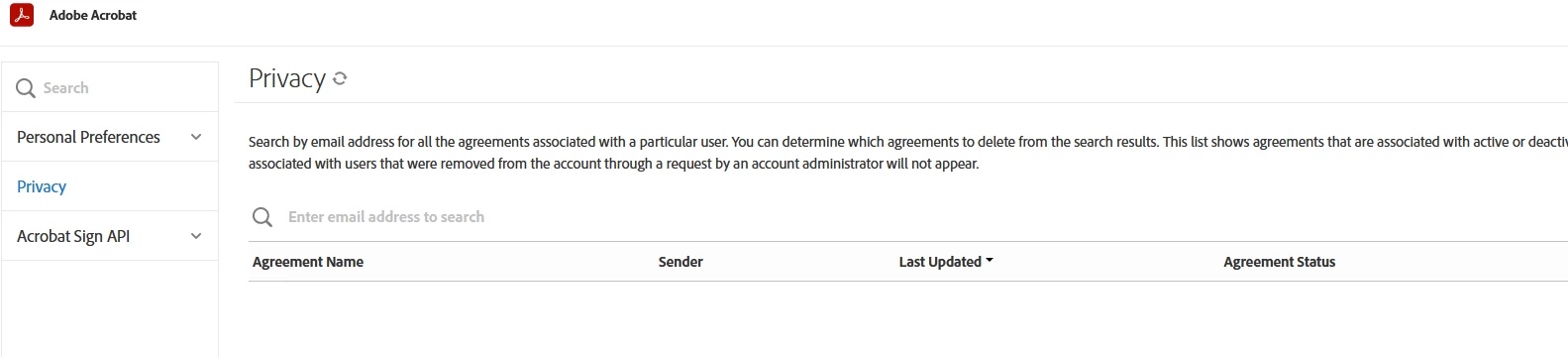
Is there an updated version of this solution - when I tried solution 2, there is no Privacy tab on my view, just "Personal Preferences" and "Acrobat Sign API". As the attached screengrab.

I want to delete an old document that appears to be in the cloud and 'archived' but which has personal information on it. This should not be so difficult to achieve, it is my data! This is absolutely in breach of GDPR, Adobe.

Participant
May 23, 2025

Did anyone figure this out? I have the same problem. I am the admin of my account but I have no privacy option

Participant
November 1, 2023

Option 2 worked for me.  Thank you so much for solving this frustrating situation.  Many thanks.


TicketyBoo
Participant
July 26, 2022

Thanks for answering. But why not just have a delete button next to the agreement?

Inspiring
July 26, 2022

TicketyBoo, I agree.  Way too complicated.

Known Participant
November 2, 2022

I logged in and it worked, so i save the link, use it after logging in normally, it took me to the page with the "privacy" link  - it's completely buried and obscure and reqires one-at-a-time deletions and only per emal addressee, very cludgy and slow. with TWO "ok" type prompts. 


https://acrobat.adobe.com/link/signatures/?signUri=%2Faccount%2FaccountSettingsPage%23pageId%3A%3ASIGNATURE_PREFERENCES

Inspiring
March 2, 2022

I've been searching for hours and have wasted enough time trying to find simple functionality which does not appear to exist. I cannot delete agreement documents from Echo Sign — no, I mean Adobe Sign — or, is it now Document Cloud? I can't keep-up. Apparently, neither can Adobe. This delete functionality existed at one time. I have the picture to prove it, attached. The picture is of a "Privacy" list of agreements, which used to be in the "Account" settings of Adobe Sign. The picture clearly (more or less) shows trash-icons next to each agreement document. As Sign was merged into Doucment Cloud, the Privacy list got left out. Was it intentional? Can I delete agreement documents or not? If so, how? If not, why? If GDPR (privacy regulations) required the feature to begin with (see https://helpx.adobe.com/in/sign/using/gdpr-compliance.html), shouldn't it still apply?

Inspiring
March 8, 2022

Thank you. That sort-of helped. The information at that link actually said that documents in Document Cloud with a status of "Archived" cannot be deleted. However, on a hunch, I tried another part of the instructions that did not exactly apply and they worked anyway. Below is what I did after logging into my Adobe account and navigating to the Document Cloud or anywhere at Acrobat.Adobe.com.

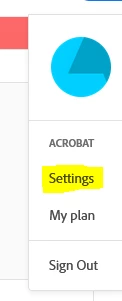
  1.  Select the Adobe cyan/blue-green disc logo in the upper-right corner. A popup menu will appear.
  2.  Select "Settings" under "Acrobat". A popup dialogue box will appear.
  3.  Select "edit settings" next to "E-signing settings". A new page will appear.
  4.  Select "Privacy" from the left menu. A new panel will appear to the right.

Provide the email address for your account and the agreements should appear ALONG WITH DELETE ICONS!

Why does this have to be so difficult?

Participant
October 28, 2021

Hi everyone, I am a student that unfortunately has misunderstood the fill and sign function. After filling the document I clicked on next, thinking that I would have obtained a so called "flat copy" of the document, instead I got the document loaded on my account as an agreement and I am not even able to delete it. How can I delete it?

Inspiring
March 2, 2022

Since your post is over four months old and still has no response, I'm guessing nobody has the answer and you still have one or more lingering agreements you can't get to go away. I did find a few references for how to delete them, due to new(ish) GDPR regulations which require document owners be allowed to control and/or remove their private information. The most recent is from May 2021 (as of the last update anyway) at https://helpx.adobe.com/in/sign/using/gdpr-compliance.html. These instruction involve accessing a "Privacy" list of the agreements under Adobe Sign's "Account" settings. A picture of the page clearly (more or less) shows trash-icons next to each agreement. Unfortunately, Adobe has done a lot of rearranging of controls and settings since then in order to merge Adobe Sign into Adobe Document Cloud. And, though the merge rendered the information out-of-date, I still tried to follow follow it intuitively, rather than literally, attempting to find this elusive "Privacy" list or anything similar. But, I could not find any.

Participant
March 9, 2022

Thank you so much for your answer and help! Fortunately, I was able to find it in the privacy section four months ago, but I confirm that it has been quite complex.

Participating Frequently
May 17, 2021

I would like to simply delete a few very old Agreements from Echo Sign, I guess now Adobe Sign.  This is a personal account and not a paid account.  These were agreements sent by a third party for my signature and not created by me.  They were signed and the process completed.  They show up in my Acrobate Reader Home/Recent and Home/All Agreements and I would like them removed from this list but that option is not available to me.  On a previous support request I was told to delete the files from my computer hard drive.  These files are not on my computer (I searched) but they are on my Echo Sign account under Your Agreements both Comleted and Archived.  What to do?

PS.  For the occasional and infrequant user of Echo/Adobe Sign I am finding this service difficult to work with and I keep going around in circles.  I am not an Administrator just a regular guy trying to remove some documents/agreements from my account so I don't have to see them on the Reader Home page.

Participating Frequently
May 17, 2021

If the only way to delete Agreements is to cancel/remove my Echo Sign account please tell me how to do that.  That might be the best option as I am tired of trying to figure it out.

Participant
March 8, 2021

I'm done with Adobe.  A simple thing like deleting an agreement requires a forum search?  I'm out.  By.

cr8vcat
Participant
March 1, 2021

Thank you for solving this! So counterintuitive...why we don't just have a delete in our agreements list I don't know!

Participant
March 4, 2021

As an added note - I tried the above and still kept getting the "Sorry, we could not process your request. Please reload the page and try again" message. Using Chrome, I deleted cookies and cache (at the advice of Adobe Chat help I will admit) and then opened a window incognito. This then worked first time !

Participant
March 15, 2021

And you used the same process? I tried this and none of my agreements are coming up on that list with either my email address or the recipients. This is the biggest waste of time. Deleting documents shouldn't be this complicated. 

Participant
October 5, 2020

I used the Fill and Sign in Adobe Acrobat Reader DC on my PC for a PDF on my PC.  When I was done with the Fill and Sign, it asked me to get a link for the document I just signed, which I did.  The person to whom I sent the link has downloaded the file and now I want to delete the document from the Adobe Cloud.  The document only appears in the All Agreements folder in the Adobe Cloud - it does not appear in the Your Documents folder.  I do not see a delete file in the All Agreements folder.  How do I delete the files in the All Agreements folder?

Meenakshi Negi
Community Manager
Community Manager
October 7, 2020

Hi Brett,


Thank you for reaching out.


As you have mentioned, you have used the Fill & Sign feature to fill the form. However, you shared it using the link.

It seems that you have used the Adobe Sign to save your signed file and then used the shareable link for that document.

The file shows under the all Agreement option as it is saved on the Adobe Sign server. To delete the file from the server, you may use the steps as suggested in the following thread: https://community.adobe.com/t5/adobe-sign/looking-for-an-option-to-delete-document-from-adobe-sign-we-can-help-you/td-p/11035932?page=1 


Let us know if you experience any issues or need any help.


Thanks,

Meenakshi