Participant
April 7, 2020
Answered

How to delete agreement in Adobe Sign?

  • April 7, 2020
  • 12 replies
  • 43390 views

I signed up for the trial version of Adobe Sign yesterday and tested how it would work to solve an issue with clients I can't currently meet face-to-face with because of COVID-19. It worked great. I sent a document from my (work) trial account to my personal email account, signed the document, and then opened the document in my (work) trial account. Super slick, I thought - this is going to be great! 


But now I can't find one single way to delete the signed (completed) agreement from within Adobe Sign and the document doesn't even appear anywhere in my Adobe Document Cloud. There are no options for deleting the document at all. I've contacted Adobe through chat and they have no solutions for this and have referred me to this page instead. I've read through past discussions and the solutions posted don't work - the screen options I get are not the same as in those solutions - perhaps because since those were posted the product has changed.


I would love help figuring out how to delete completed documents because it will be a necessary step each time I receive a signed document from a client. I don't want any of the signed documents stored in my account or on the cloud. I believe I should ultimately control that information and also should feel good about that. The documents I will be sending for signature will contain personal identifying information and I don't want them stored on the cloud.


Thanks in advance.

Correct answer Meenakshi Negi

I couldn't load that site either.

When calling the hotline they were telling me that individual accounts can not delete (!) agreements, but only "hide" them by opening them in the agreement overview --> https://acrobat.adobe.com/link/documents/agreements/#agreement_type=all 

on the right hand side click on the strike through eye symbol saying 'hide agreement'.

Then you can still access the file for some time by clicking on "filter" in the overview menu

https://acrobat.adobe.com/link/documents/agreements/#agreement_type=all  and "show hidden agreements". But they told me eventually it will be deleted then.

They also told me I would have to upgrade my account to company account in order to directly delete agreements.

What a drag!


Hi camillor87325755,


Thank you for reaching out.


As you wish to delete the document from the Adobe Acrobat Sign account, please use the steps suggested in the following help document:

1. Open the link: https://acrobat.adobe.com/link/home/

2. Sign in using the Adobe ID and password.

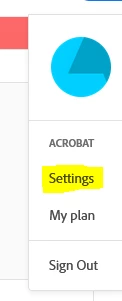
3. Then click on the Profile icon and select Settings.


4. Go to E-Sign settings and click on Edit settings.


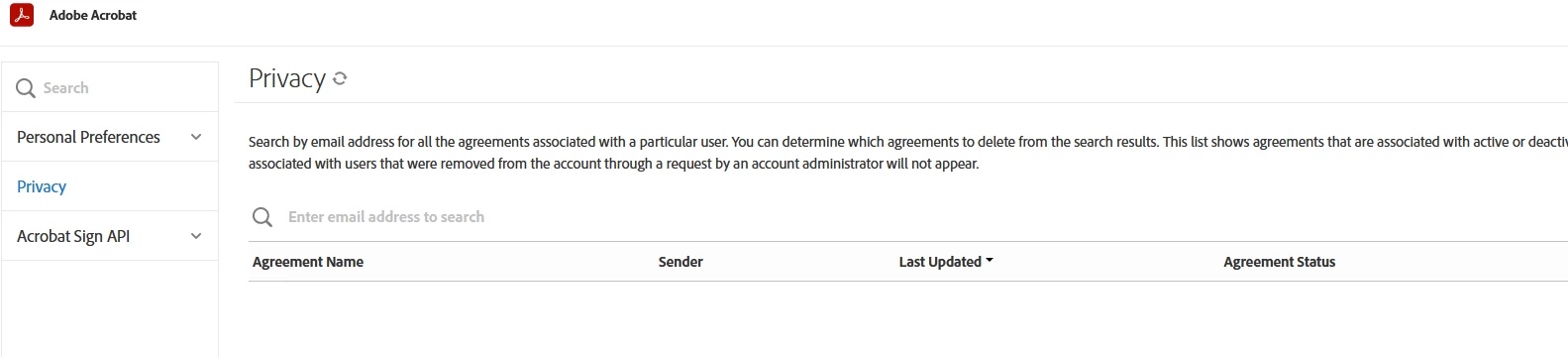
5. Go to the Privacy tab and search the document using the email address used in the transaction.


6. Now select the document from the list and click on the trash icon next to it.

That will remove the document from the Acrobat Sign server permanently.


Let us know if you do not find any option or experience any issues.


Thanks,

Meenakshi

12 replies

Known Participant
July 19, 2020

I have read all the "solutions" but none fit the bill. I have Adobe CC and Adobe Sign is part of the Acrobat Pro DC platform. Within Document Cloud, I can delete docs. Within "Sign" (bottom of left hand column) there are no options to delete agreements, all of which were authored by me.  Can someone please explain how to do this?

Thank you!

Tim


ps - i've attached a screen grab of the options I have.

Participant
April 7, 2020

This is the closest thing I have been able to find that talks about deleting agreements, user information, etc. What I cannot find is anywhere in my account where I have privacy admin rights, even though I set up the account. Maybe this is because I have a free trial and not a paid subscription to Adobe Sign - but I think that even as a free user I should be able to delete a document / control what is in my account. https://helpx.adobe.com/sign/using/gdpr-compliance.html#Agreements


Thanks again.

Participant
May 8, 2020

Hello there - Suetrnka
I read your post as I am having the same trouble with the trial of adobe sign. I contacted Adobe and they deferred to this community.

I was able to delete one agreement, not sure how that happened because I can't replicate it again. 

Were you able to resolve this issue fully?

Regards,

Sudi

Participant
May 12, 2020

No, I was not. I'm still very frustrated. I've seen other posts in this community asking the same question, and the responses are all the same - but the options in the responses are not available on my screen/in my account.


The only option I have on the Agreements screen in Adobe Sign is to hide it - which doesn't delete it. 


In the Account screen in Adobe Sign, I do not have Privacy tab as shown in the responses, either.


Not being able to delete completed agreements is a major problem and Adobe needs to address this!