xyzadvantage
Participant
June 28, 2019
Answered

How to delete signed document?

  • June 28, 2019
  • 1 reply
  • 20493 views

I find the document in Adobe Sign Manage, under Shared > For Signature > Signed and would like to remove it. The only options available are:

1. Print, enlarge, pdf. hide

2. View, share, protect, remind, history notes

I checked all the articles regarding clicking on the file and then "cancel" and "delete" and don't see either of these buttons. Please help.

This topic has been closed for replies.
Correct answer Meenakshi_Negi

Hi Yanz,

Sorry for the delay in response.

If you are trying to remove the account from the manage page, then use the "Hide" option provided when you select the document from the list.

To permanently remove the document from the account, please refer to the steps provided below in order to delete the document from Adobe Sign.

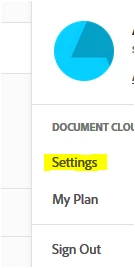
- In the account, click on the circle in blue provided at the extreme right-hand side of the screen.

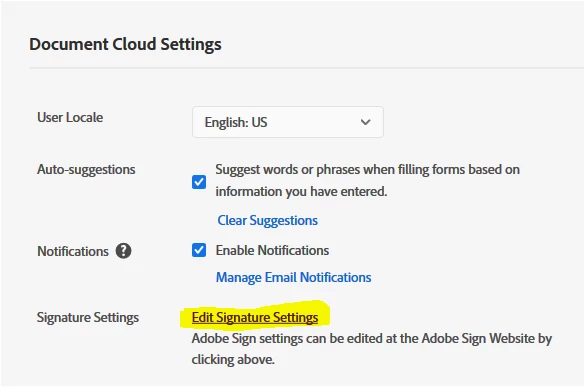
- Select Settings > Edit signature settings.
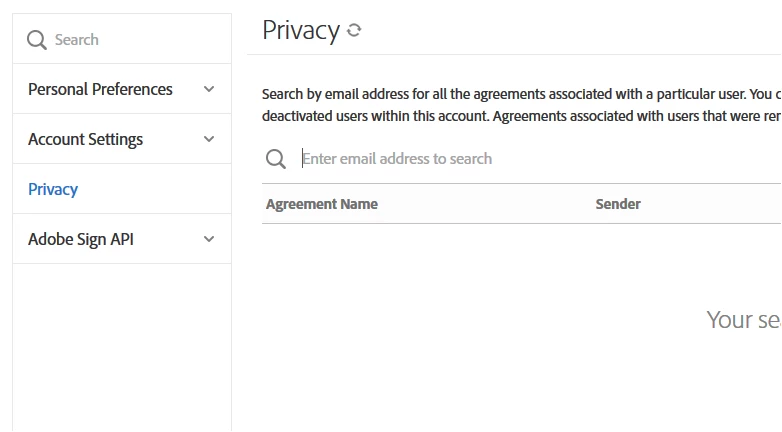
- Then select "Privacy" from the left-hand side pane.

- Enter the email address of the recipient in the search bar. That will open all the documents for that particular recipient.
- Select the document from the list that needs to be deleted.

- Click on the trash icon provided at the extreme right-hand side of the document.

Hope the information helps.

Let us know if you have any questions.

Regards,

Meenakshi

1 reply

Meenakshi_Negi
Meenakshi_NegiCorrect answer
Legend
July 13, 2019

Hi Yanz,

Sorry for the delay in response.

If you are trying to remove the account from the manage page, then use the "Hide" option provided when you select the document from the list.

To permanently remove the document from the account, please refer to the steps provided below in order to delete the document from Adobe Sign.

- In the account, click on the circle in blue provided at the extreme right-hand side of the screen.

- Select Settings > Edit signature settings.

- Then select "Privacy" from the left-hand side pane.

- Enter the email address of the recipient in the search bar. That will open all the documents for that particular recipient.

- Select the document from the list that needs to be deleted.

- Click on the trash icon provided at the extreme right-hand side of the document.

Hope the information helps.

Let us know if you have any questions.

Regards,

Meenakshi

xyzadvantage
Participant
July 13, 2019

Awesome! Thank you, Meenakshi!