
Participating Frequently
September 18, 2025
Question

How to keep document to one Page?

  • September 18, 2025
  • 1 reply
  • 330 views

A 1 page acknowledgement form has 3 signature boxes. For some reason the form adds a 2nd pages and signature appear there when sent for signatures..
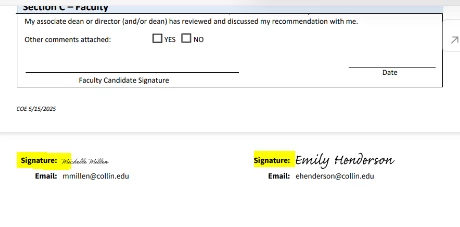
How to keep the form to keep everything on 1 page?


Thank you for your knowledge and consideration.


DT

1 reply

Meenakshi Negi
Community Manager
Community Manager
September 18, 2025

Hi Akyron,


Thank you for reaching out.


Please let us know if you are referring that the signature boxes being added automatically, even when you have already added the signature fields. If you are referring to something else, please share more information about the workflow. It would be helpful if you could share the screen recording showing what is happening. Also, could you check if this happens with other documents as well?


Thanks,

Meenakshi

Participant
September 19, 2025

The signature boxes are in the document. There are three. Somehow, the end result is two pages as opposed to a single page, which is the requirement. Examples attached. Using the send for signature option seems to lead to this issue.


Thank you for reviewing this issue.


DT

Meenakshi Negi
Community Manager
Community Manager
September 19, 2025

Hi Diego22347945ppfd,


Thank you for sharing the files. 

The signature field on the second page, was it added by you or added on its own when sent for signature? Also, let us know if you are using the digital signature field in the document.


Thanks,

Meenakshi