
Participant
April 1, 2019
Answered

how to let the signer's initials appear on all pages

  • April 1, 2019
  • 2 replies
  • 38743 views

hello

I have a document. at the end of the document the signer signs and types in his initials (both on the last page).

what I want to do: I want to let his initials appear on every page, always on the same place.

I know this could be done by simply placing initials-fields on each page.

however, this would mean the signer would have to click on EVERY page - and my documents has hundreds of pages.

so obviously this won't work.

my vision / goal is that the signer can sign / type once, and his initials appear on all pages (on the defined place on each page).

how can I do this with adobe sign..?

thank you in advance!

martin
Correct answer ScottCarter

Greetings!
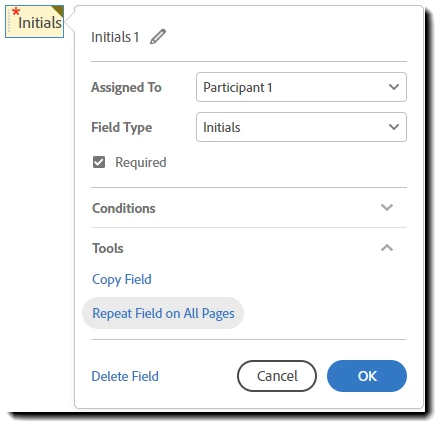
To briefly touch the idea of placing a field on every page, all levels of service can repeat a field on every page (in the same X,Y location on the page) by using the Repeat Field on All Pages feature in the Tools section of the field properties:

You can uncheck the Required  parameter if the signer is initialing only by the items they agree to.

By explicitly forcing the signer to click into the field to place the initials, you are obtaining a "willingness to agree" that you do not get by automatically placing something like an image of the initials programmatically. This level of "friction" indicates "awareness".

2 replies

ScottCarterCommunity ManagerCorrect answer
Community Manager
April 2, 2019

Greetings!
To briefly touch the idea of placing a field on every page, all levels of service can repeat a field on every page (in the same X,Y location on the page) by using the Repeat Field on All Pages feature in the Tools section of the field properties:

You can uncheck the Required  parameter if the signer is initialing only by the items they agree to.

By explicitly forcing the signer to click into the field to place the initials, you are obtaining a "willingness to agree" that you do not get by automatically placing something like an image of the initials programmatically. This level of "friction" indicates "awareness".

Participant
April 6, 2019

YES - thank you!

now it works with manually added fields. my follow-up question is: how do I do this with text tags?

I started a new thread for this question, please see:

repeated initials field (not required) via text tags

Participant
April 1, 2019

Martin,

I have some general thoughts on this, having heard similar requests in the past. Keep in mind, I'm not an attorney and you should validate my experience-based assertions with your General Counsel or company attorney.

First, typically in documents where initials are required on every page, it's supposed to signify that the person has reviewed each page and agrees to it.  In traditional, ink-based signing, they are then required to initial every page for this purpose. To that end, from a legal enforceability perspective, if you automatically place their initial on every page after they apply it once, you would circumvent them from actually reviewing the multitude of pages.  In this sense, the person signing could at a later point claim that s/he signed once and the signature was placed on every page, thereby challenging the validity of the whole document and process.

Second, there was a legal case around 2010 against a loan processing company which provided a means of automatically and quickly signing foreclosure documents.  One person was found criminally liable and the major banks all paid a very hefty fine (to the tune of billions of dollars). Here's a short write up that speaks to it: Robo-signing in Foreclosures: What Homeowners Can Do About It | Nolo

So, my suggestion to you is to ask why you need initials on every page. If it's to depict that the person has actually read every page, then follow the process of them placing their signature on every page manually to ensure enforceability of the documents and avoid legal issues for your company.

However, if the requirement is to show that the person received a copy of the document and they need to place just one signature signifying such, I suggest moving the signature or initial to the end of the document, forcing the person to review and sign at the end.

I'm happy to answer any other questions you have around this.

Take care,

Arash

[ private informations removed by moderator --> https://forums.adobe.com/docs/DOC-3731 ]

Participant
April 1, 2019

hi arash

thank you for your reply & thoughts on this.

I agree with you that the points you brought up are certainly valid in an usual agreement / contract.

however, my case is a bit special:

the document is a long list of musical works (one page for each work), and a third party wishes to have the initials besides each work (ie, no each page).

so, it's not an 'usual' contract or the like were all your points are certainly valid.

rather its a long list, and it needs the initial of the signer on each page.

so the scenario is a bit different, and my question remains the same: can I (and if so, how) do this with adobe sign?

thank you!

martin

Participant
April 1, 2019

I'm not aware of any way of setting up an auto-placement of initial on all pages by placing it on a single page.

However, if you want to place a data field that will take any text typed in, you can replicate the value across all data fields.  The upside is that you're replicating the data as you wish.  The downside is that a person can type in whatever they want.

Take care,

Arash

[ private informations removed by moderator --> https://forums.adobe.com/docs/DOC-3731 ]