


cilstone
Participant
February 27, 2018
Answered

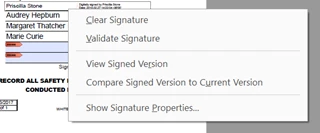
How to Override or Block "Clear Signature" option

  • February 27, 2018
  • 1 reply
  • 943 views

Hi,

I am working with a form that requires multiple signatures and will be signed on the same computer. I have the signature form field properties set to change the document to "Read only" from the point that it's signed and above. The unsigned fields stay open. However, any signer has the ability to right-click and "clear  signatures." Is there a way to block or override that? TIA.
This topic has been closed for replies.
Correct answer Meenakshi_Negi

Hi Cilstone,

Sorry for the delay in response.

As you are adding multiple signatures to the document from the same computer, sorry to say there is no option to remove this block or override that.

You may try either signing the PDF using "Fill & Sign" or can use Adobe Sign to add multiple signatures on the same document.

Refer this help document Send agreements and collect signatures for more information on Adobe Sign.

Hope the information helps.

Regards,

Meenakshi

1 reply

Meenakshi_Negi
Meenakshi_NegiCorrect answer
Legend
April 19, 2018

Hi Cilstone,

Sorry for the delay in response.

As you are adding multiple signatures to the document from the same computer, sorry to say there is no option to remove this block or override that.

You may try either signing the PDF using "Fill & Sign" or can use Adobe Sign to add multiple signatures on the same document.

Refer this help document Send agreements and collect signatures for more information on Adobe Sign.

Hope the information helps.

Regards,

Meenakshi
