
Participant
April 27, 2020
Answered

how to put initials on document without signature on last page

  • April 27, 2020
  • 3 replies
  • 6850 views

Hello,

we are using Adobe Sign to sign purchasing contracts. Some people have to put their initials on the document and other people have to sign it with their signature.

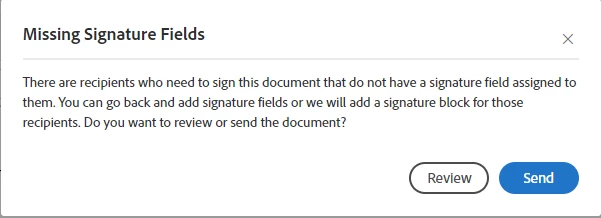
I tested it two weeks ago and had no problem with this constellation. Since a few days I got the following warning. If I click on "send", Adobe Sign add new signature block for every person who only should initial.

Is there a solution for this constellation of signers? We don't want these signature blocks on the last page of the document.
 

Correct answer CSM_Shannon

Hi, 

If you have our Small Business, Business or Enterprise Plan you choose change the Recipient Role of those who only need to add initials. For example, if Recipient 1 only needs to initial you can change the roles Approver or Acceptor  on the Send Page and by adding only an initial field Sign will not add a signature page. 


Here is some additional information regarding Recipient Roles - https://helpx.adobe.com/sign/using/set-up-signer-approver-roles.html


I hope this was helpful; be well. 


Shannon 

3 replies

Participant
November 11, 2025

To add, there's a bit more information at the bottom of the following older thread:

https://community.adobe.com/t5/adobe-acrobat-sign-discussions/documents-for-initials-only/m-p/10244896

Additionally a few related links:

https://helpx.adobe.com/sign/config/sig-prefs/allow-recipients-sign-by.html

https://helpx.adobe.com/sign/config/sig-prefs/allow-recipients-sign-by.html


Basically it's a combination of having certain permissions enabled and only certain sign types allow asking just for initials which Adobe of course doesn't make clear one bit

kristinck
Participant
September 12, 2022

SOLVED! Check the "Advanced Editing On" button at the top right corner, then click "signature fields", then DRAG the "initials" box to your document. 

CSM_ShannonCorrect answer
Adobe Employee
April 27, 2020

Hi, 

If you have our Small Business, Business or Enterprise Plan you choose change the Recipient Role of those who only need to add initials. For example, if Recipient 1 only needs to initial you can change the roles Approver or Acceptor  on the Send Page and by adding only an initial field Sign will not add a signature page. 


Here is some additional information regarding Recipient Roles - https://helpx.adobe.com/sign/using/set-up-signer-approver-roles.html


I hope this was helpful; be well. 


Shannon 

Participant
March 10, 2022

My current group setting is as approvers.  However, when the employee initials the document a signature page is added at the end of the document.  Do you have a step-by-step guide on how to inital a document and not have a signature added to the last page?