
Participant
February 21, 2017
Answered

How to save a secured document that is signed and returned by client without printing and scanning to save as an on-line file.
  • February 21, 2017
  • 1 reply
  • 645 views

How to save a secured document that is signed and returned by client without printing and scanning to save as an on-line file.

    This topic has been closed for replies.
    Correct answer AadeshSingh

    Hi lisak94299535

    Download the signed document on your system & then send it as an attachment via email.

    Steps to Download the Signed document from Adobe Sign account:

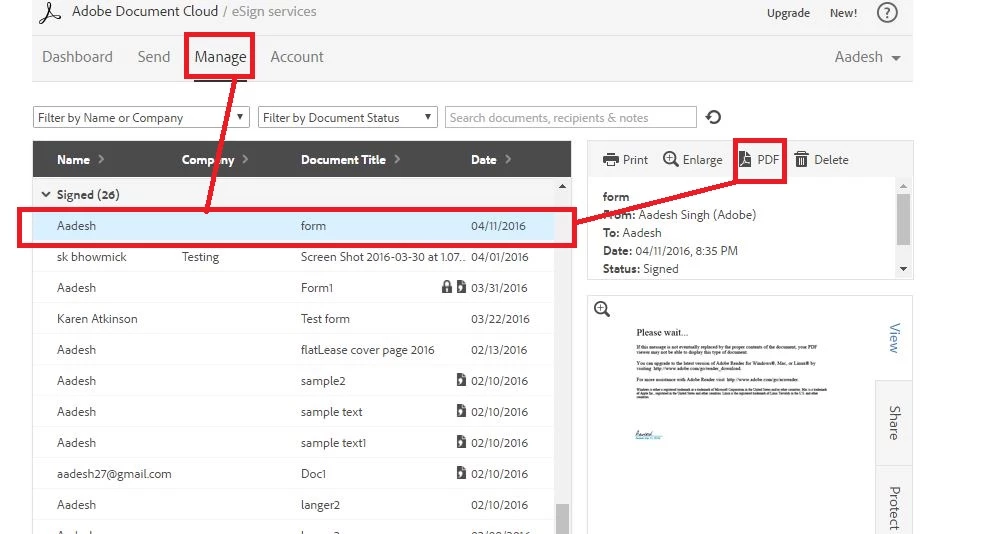
    Login to your Adobe Sign account, navigate to Manage page, select the document under the "Signed" Category and hit the "PDF" button at the top right corner.

    Document will open up in the browser, please click on the Download & Save button.

    Regards,
    Aadesh

    1 reply

    AadeshSingh
    Community Manager
    AadeshSinghCommunity ManagerCorrect answer
    Community Manager
    February 23, 2017

    Hi lisak94299535

    Download the signed document on your system & then send it as an attachment via email.

    Steps to Download the Signed document from Adobe Sign account:

    Login to your Adobe Sign account, navigate to Manage page, select the document under the "Signed" Category and hit the "PDF" button at the top right corner.

    Document will open up in the browser, please click on the Download & Save button.

    Regards,
    Aadesh