Answered
how to save a template?
I know how to download but after I have made my document and dowloaded how do I save it in my library. Someone wrote me to go to download and then save as a template but I don't know how to do this.

I know how to download but after I have made my document and dowloaded how do I save it in my library. Someone wrote me to go to download and then save as a template but I don't know how to do this.
Hello,
In order to upload library templates please follow the steps mentioned below:-
- Login to your Document Cloud account
- Select Add Template to Library
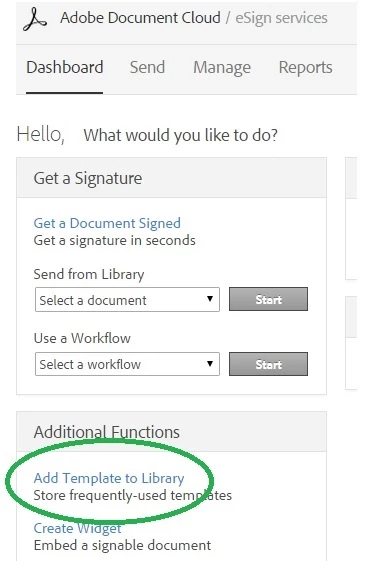
- Browse and upload the document
- Select permissions
- Click Preview or Add Fields
- Place form fields (if required)
- Place Signature field
- Click Save
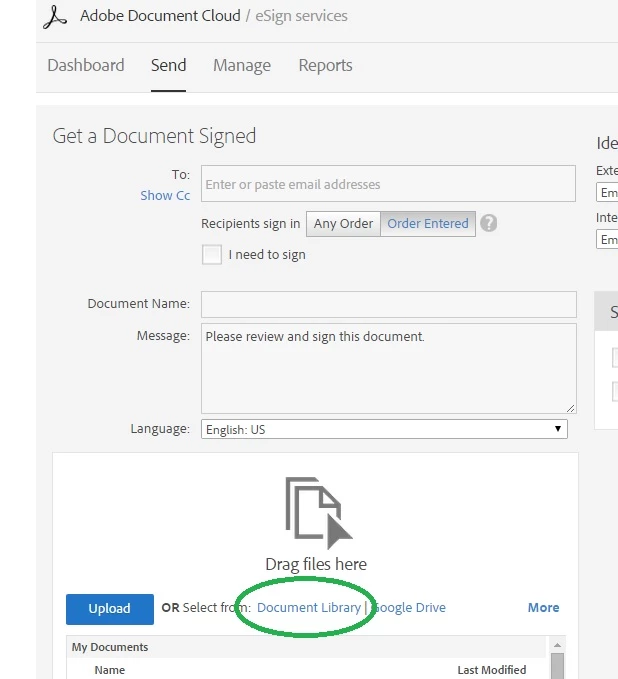
In order to send a saved template- Go to Send tab and select the document under Document Library:
Regards,
Nakul
Already have an account? Login
Enter your E-mail address. We'll send you an e-mail with instructions to reset your password.
 AdChoices