


Feb 7, 2017 9:54 AM UTC
Answered

How to set custom width for signature field

Hi,

We are generating pdf application forms using html and then the pdf is sent to users for their signature using Adobe Echosign API .

we tried adding in html following html code to adjust the signature field length to fit inside given Div. It didnt help out.

<table cellpadding="0" cellspacing="0" width="250" height="50" ><tr><td><em style="font-size:21pt; width:250px; display:block;">{{Sig_es_:signer1:signature}}</em></td></tr></table>
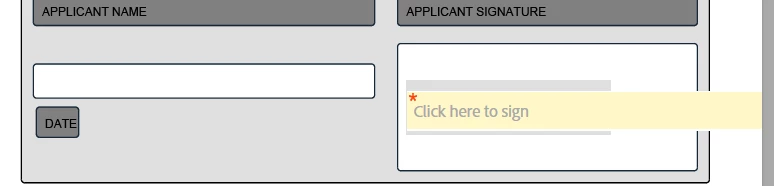
How do we set the custom width for the signature field?

Thanks in Advance for any help or solution

This topic is closed to new replies. Start a new post to keep the conversation going.
Correct answer
Feb 10, 2017 12:00 PM UTC

Got it. 

<style type="text/css" >

.sign_style{

                        display:block;

                        width:300px;

                        font-size:23px;                       

                      }

</style>

<input type="text" class="sign_style" name="Sig_es_:signer1:signature" />

2 replies

AadeshSingh
Participating Frequently
Feb 12, 2017 1:32 AM UTC

Hi paragr72672201​,

Great! We are glad that you were able to find the text tag and thank you for sharing it for the other user.

Regards,

Aadesh

Translate
Correct answer
Feb 10, 2017 12:00 PM UTC

Got it. 

<style type="text/css" >

.sign_style{

                        display:block;

                        width:300px;

                        font-size:23px;                       

                      }

</style>

<input type="text" class="sign_style" name="Sig_es_:signer1:signature" />

Translate