VHS
Participant
August 25, 2015
Answered

How to sign multiple documents attached to send for signature

  • August 25, 2015
  • 1 reply
  • 1607 views

I want to send multiple documents as one  attachment to one recipient .  Each document attached to have specific  areas needs to be pre filled and signed.  Each document also have specific areas  where recipient needs to sign  and initial.  Once the recipient's signs the document needs to come back  to me so that I can sign in multiple areas of the documents . 

Currently when I try to do it,  I am able to sent the document where the recipient can pre fill and sign,  but when it returns back to me,  I  do not have the option to sign at particular location in the document-  instead I can only sign  at the last page of the document one time.

Any tips to help with this?

Thank you
This topic has been closed for replies.
Correct answer NakulB

Hello,

In this case, you can manually place the signature field and assign the correct role to the field.

You may follow the workflow mentioned below:-

- Go to send tab

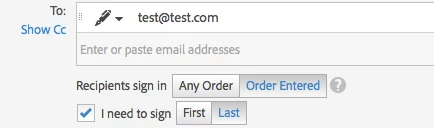
- Select I need to Sign (Last)

- Check preview position signatures

- Manually place a signature field for your signatures

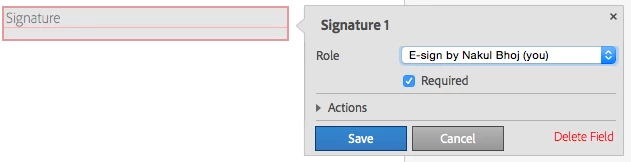
- Double click on the field and change the field role to E-sign by you

Regards,

Nakul

1 reply

NakulBCorrect answer
Adobe Employee
August 26, 2015

Hello,

In this case, you can manually place the signature field and assign the correct role to the field.

You may follow the workflow mentioned below:-

- Go to send tab

- Select I need to Sign (Last)

- Check preview position signatures

- Manually place a signature field for your signatures

- Double click on the field and change the field role to E-sign by you

Regards,

Nakul