

Mike AW
Participant
April 11, 2022
Answered

HYBRID ordering of recipients not working in Adobe Sign

  • April 11, 2022
  • 2 replies
  • 1198 views

I have a list of emails that I have typed in (fictitous for the purpose of this screen shot, but get same results with real email addresses), and try and use drag and drop to move one address onto another to make them "equal order" of signage.


However, the order does not "stick" and reverts back to the existing list order - see photo below.
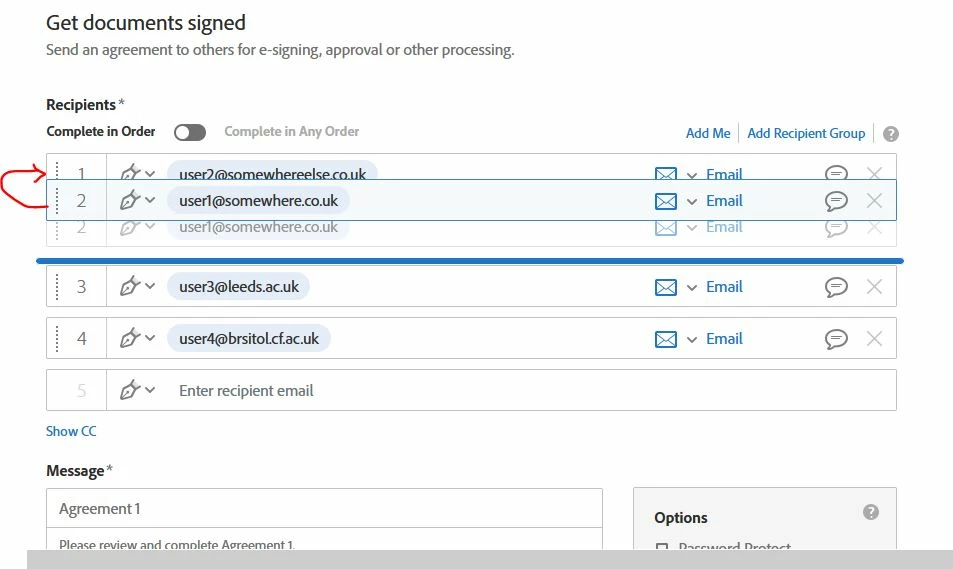


Have tested as this as not working on 3 browsers (Edge, Chrome and Firefox).


One other person in my organisation also has this problem.


This topic has been closed for replies.
Correct answer Mike AW

I have now resolved my issue with the help of Adobe Support.


In the Adobe Admin Portal an account should be set up to have admin rights for Adobe Sign for your organization.

That account can then login to the Adobe Sign portal at
https://secure.adobesign.com/public/login


Note that the setting to "allow sender to specify hybrid routing order" cannot be set up at the individual level.

It can either be applied to all users for the organization, or it can be applied to a Group of users.


This is done as follows for all users:

Navigate to Account > Account Settings > Send Settings > Signing Order >> Allow sender to specify hybrid routing order


For the Gorup level, this can be done via:

Account>>Groups>>Group Settings>>Override account settings>>Signing Order>>Allow sender to specify hybrid routing order


2 replies

Participant
April 13, 2022

I am having the same problem today. 


Mike AW
Mike AWAuthor
Participant
April 14, 2022

Sorry to hear that, but at least its nice to know its not an isolated problem. I will try and get our admin to submit a support call.

Meenakshi_Negi
Legend
April 12, 2022

Hi Mike,


Thank you for reaching out.


We have checked the feature is working fine at our end. As it is not working only for two of you in the organization, please check with your account admin if the setting is disabled for these two accounts. That might be the reason you are not able to use the feature.


If that is not the case, please ask your admin to contact the support team to check it further. You may contact the Adobe Acrobat Sign Enterprise support team using the steps suggested in the help document: https://helpx.adobe.com/sign/using/adobesign-support-resources.html.


Let us know how it goes.


Thanks,

Meenakshi