


Participant
October 16, 2015
Answered

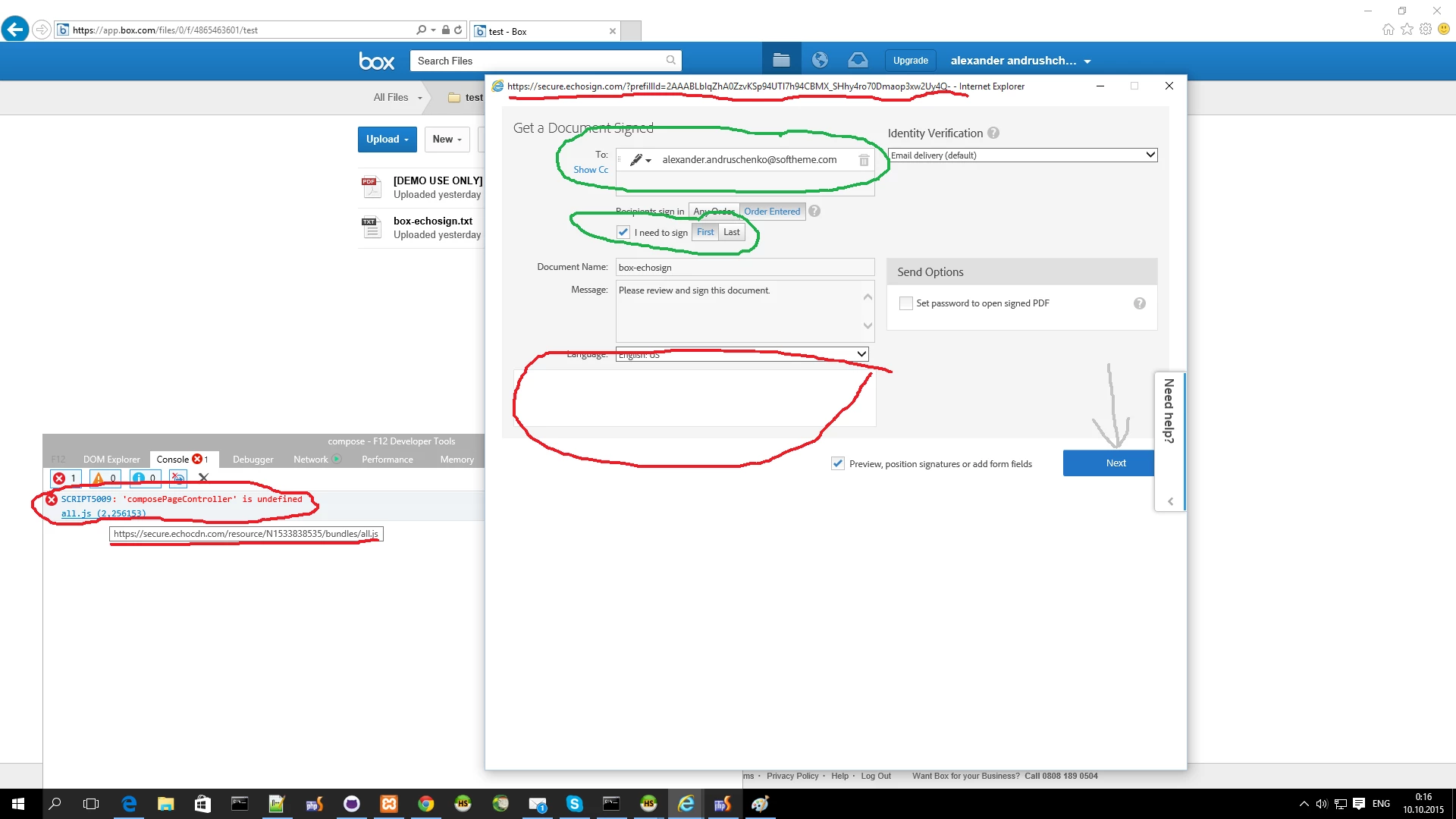
IE10-11 bug

  • October 16, 2015
  • 1 reply
  • 545 views

Steps to reproduce:

Login to https://app.box.com in IE11

Right click on a document and click More Actions->eSign with Adobe EchosSign -Stage

Select a destination Folder

Enter recipient

Select I need to sign and select First

Click Next and here we are!
This topic is closed to new replies. Start a new post to keep the conversation going.
Correct answer Anubha Goel

Hi alexander.andruschenko,

You might need to update your Flash Player.

See: Adobe - Flash Player

Also, try clearing the cache and delete browser cookies.

If this does not help, then please try using a different browser and check again.

Regards,

Anubha

1 reply

Anubha Goel
Anubha GoelCorrect answer
Participating Frequently
October 26, 2015

Hi alexander.andruschenko,

You might need to update your Flash Player.

See: Adobe - Flash Player

Also, try clearing the cache and delete browser cookies.

If this does not help, then please try using a different browser and check again.

Regards,

Anubha