
philk39929530
Participant
August 11, 2020
Question

InDesign Interactive PDF doesn't have live links when signed with Adobe Sign

  • August 11, 2020
  • 4 replies
  • 698 views

Hi there, wonder if anyone can help.


We have created an interactive PDF in Indesign that is sent out to clients so that they can choose the options they need and then sign the document.


We have text boxes within the PDF so that the client can paste URLs to show us the exact product they want (see example pages below and attached PDF).
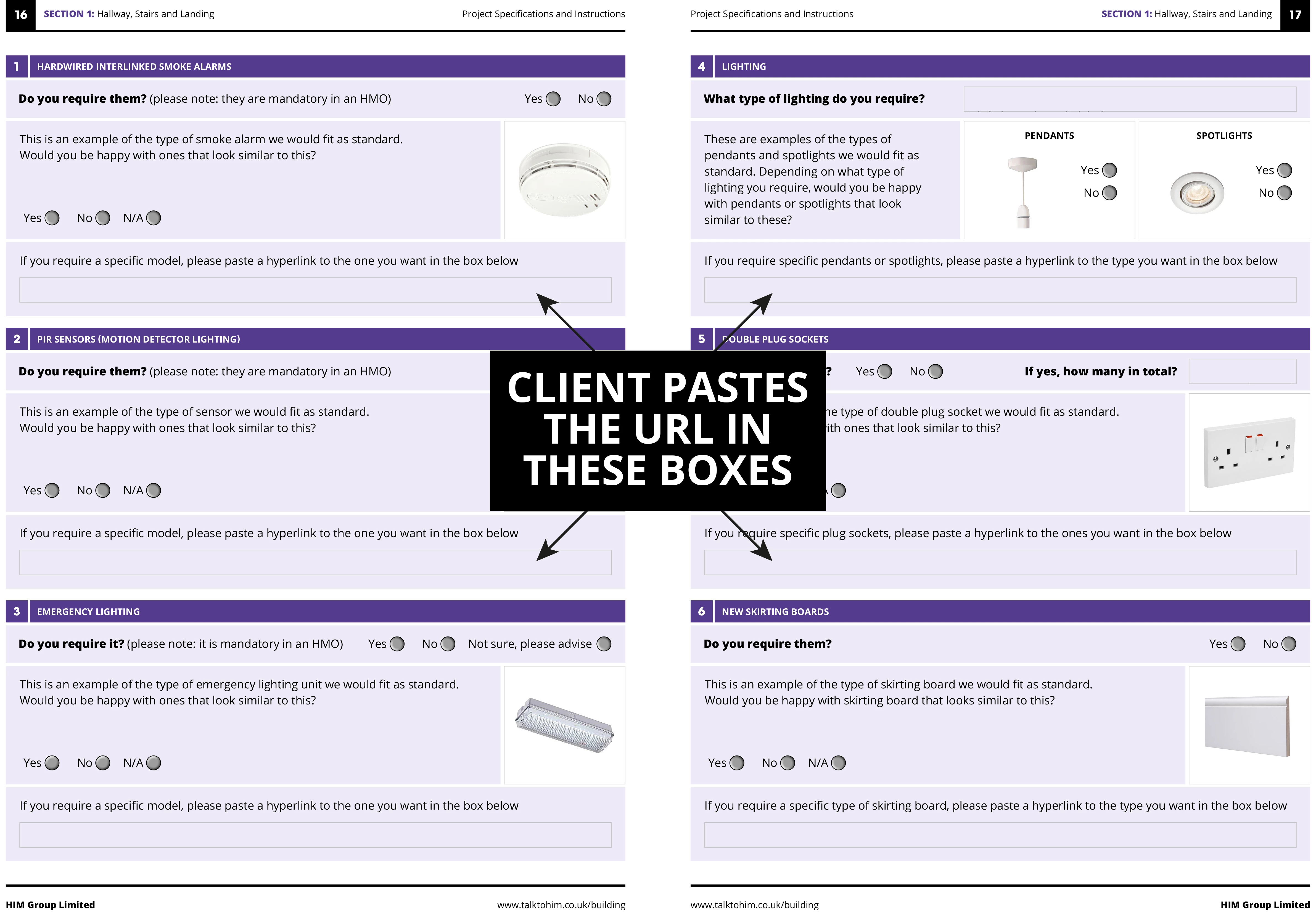


For some reason however, when the signed PDF is returned, the hyperlinks to these URLs are not live.

Does anyone know of a way to make/keep them live when a document has been signed OR is it NOT possible because the document is locked once signed?

Thank you in advance.

This topic has been closed for replies.

4 replies

Adobe Employee
August 12, 2020

Hi Phil,

I can only guess as to why this is.

They disable/remove buttons and links and I believe they also disable any kind of logic. The reason for this most likely is, that when you sign a document it has to be ensured that this document does not change at all (open or under the hood) apart from the defined areas (fields and signature detected by Adobe Sign). Also, the user is in a "signing context" when the document opens. If you allow them to jump out of that by following a link it will break the current context.

The workaround could be that you have the user fill out some information on your web-site before the sign workflow is started or you download the data as shown here https://helpx.adobe.com/sign/kb/export-data-from-document--has-form-data----adobe-sign.html

There is also an API for which one functionality is the download of the entered data https://www.adobe.io/apis/documentcloud/sign/docs.html#!adobedocs/adobe-sign/master/api_usage/download_agreement.md

Documentation of the API here: https://www.adobe.io/apis/documentcloud/sign/docs.html#!adobedocs/adobe-sign/master/README.md

Regards
Kosta


philk39929530
Participant
August 12, 2020

Hi Kosta,

Thank you for your help with this. It's great that the data can be exported, but we really needed the data to be associated with the appropriate images (as you see them in the PDF).


Not to worry. Thanks for taking the time to help us with a workaround. Very much appreciated.


Best wishes,


Phil 

Adobe Employee
August 11, 2020

Hi,

this has been answered before, please see here: https://community.adobe.com/t5/acrobat/hyperlinks-not-working-in-adobe-sign/td-p/10571552?page=1

Yes, the PDF you receive for signing is flattened, Adobe Sign fields are overlayed and it is certified. No logic and no buttons or links do work. The links actually disappear completely.

Regards

Kosta

philk39929530
Participant
August 11, 2020

Hi Kosta,

Many thanks for this. I understand why the document would be flattened for security purposes (and so that details cannot be altered) but I don't understand why a hyperlink wouldn't still be live (as it's only a reference point).


We can still see the links in the signed document, they're just not live. This means we still have the additional task of collating all the data contained within the document and pasting it into Word (for arguments sake) just so that the links can actually be clicked as intended.

Surely there must be a workaround for this.

Thanks for taking the time to get back to me, Kosta. Much appreciated.

Best wishes,

Phil

BobLevine
Community Expert
Community Expert
August 11, 2020

Moved to Adobe Sign forum.

Community Expert
August 11, 2020

Hi Phil,

hm. Sorry, I have no idea. What's the application you sign the PDF with? Acrobat Pro DC?


Then wouldn't be the Acrobat forum the right one for asking?

https://community.adobe.com/t5/acrobat/bd-p/acrobat?page=1&sort=latest_replies&filter=all


Or the Adobe Sign forum?

https://community.adobe.com/t5/adobe-sign/bd-p/adobe-sign?page=1&sort=latest_replies&filter=all


Regards,
Uwe Laubender

( ACP )

philk39929530
Participant
August 11, 2020

Hi Uwe,

No worries, thanks anyway. I wasn't sure which forum to post it in. This is the one the guys from Adobe actually recommended as I asked the same question on their facbook page.

Kind regards,

Phil