
Participant
February 9, 2022
Answered

Master object not showing all custom objects in Agreement Template

  • February 9, 2022
  • 2 replies
  • 1125 views

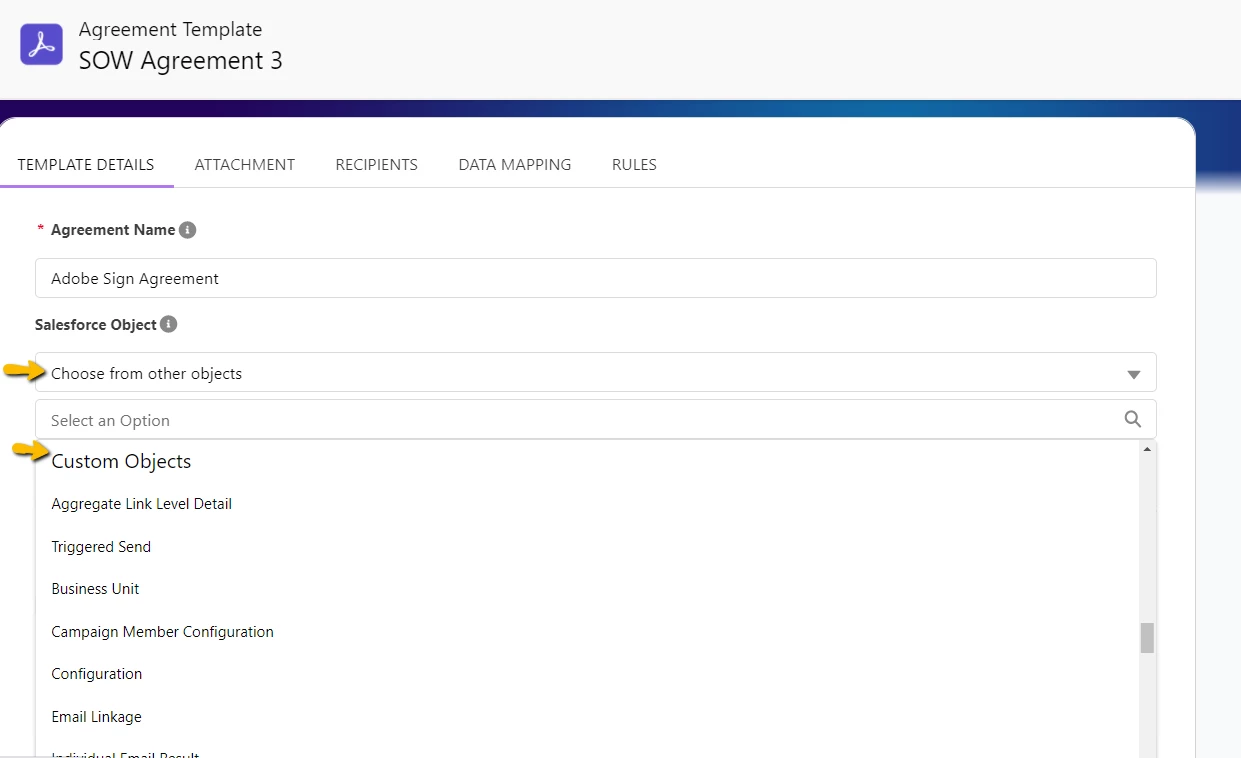
I'm trying to set a custom object from a managed package as the master object of an agreement template in Adobe Sign for Salesforce. But its showing only few objects in master objects' dropdown for custom objects, the one that I need to select is not showing up. The user with which I logged in to salesforce does have permissions for that object, still its not visible. Any suggestions. Please help.
 

Correct answer Meenakshi_Negi

Hi ashok_5415,


Thank you for reaching out.


We checked your account and saw that you are using the Acrobat Sign individual service plan. This plan does not include the integration feature.

However, if you are using the Acrobat Sign Enterprise plan with an alternate email address, 

the experts can best answer it. Please contact our Adobe Sign Enterprise support team for the correct information. You may contact them using the steps in the following help document: https://adobe.ly/3SzuvxH.

Refer to the following help document for more information on Acrobat Sign Integration: https://adobe.ly/3H4w57X.


Thanks,

Meenakshi

2 replies

Participant
May 21, 2025

Hi @Engage23074179kid7 , 
could you please provide the workaround for this issue?

Thank you!

Meenakshi_Negi
Meenakshi_NegiCorrect answer
Legend
May 21, 2025

Hi ashok_5415,


Thank you for reaching out.


We checked your account and saw that you are using the Acrobat Sign individual service plan. This plan does not include the integration feature.

However, if you are using the Acrobat Sign Enterprise plan with an alternate email address, 

the experts can best answer it. Please contact our Adobe Sign Enterprise support team for the correct information. You may contact them using the steps in the following help document: https://adobe.ly/3SzuvxH.

Refer to the following help document for more information on Acrobat Sign Integration: https://adobe.ly/3H4w57X.


Thanks,

Meenakshi

Participant
February 9, 2022

Hi All,

I'm not able to make changes in above question, but just to inform, this is happening in 'Agreement Template' of Adobe Sign for Salesforce app.


If anyone stuck at this, then I found the below workaround:

I'm still not able to see it in UI, but from backend I was able to populate the API name of my managed package field in Agreement template object's field: "echosign_dev1__Master_Object_Type__c". It works fine.


Participant
February 24, 2022

Hi @Engage23074179kid7 ! I'm so glad you posted this. I actually don't get any custom objects showing up. 

How exactly did you implement the workaround? Thanks.