Thanks, Mariah. My boss gave me Admin privileges and customer support helped me find the setting I needed to change. Thanks for your help!
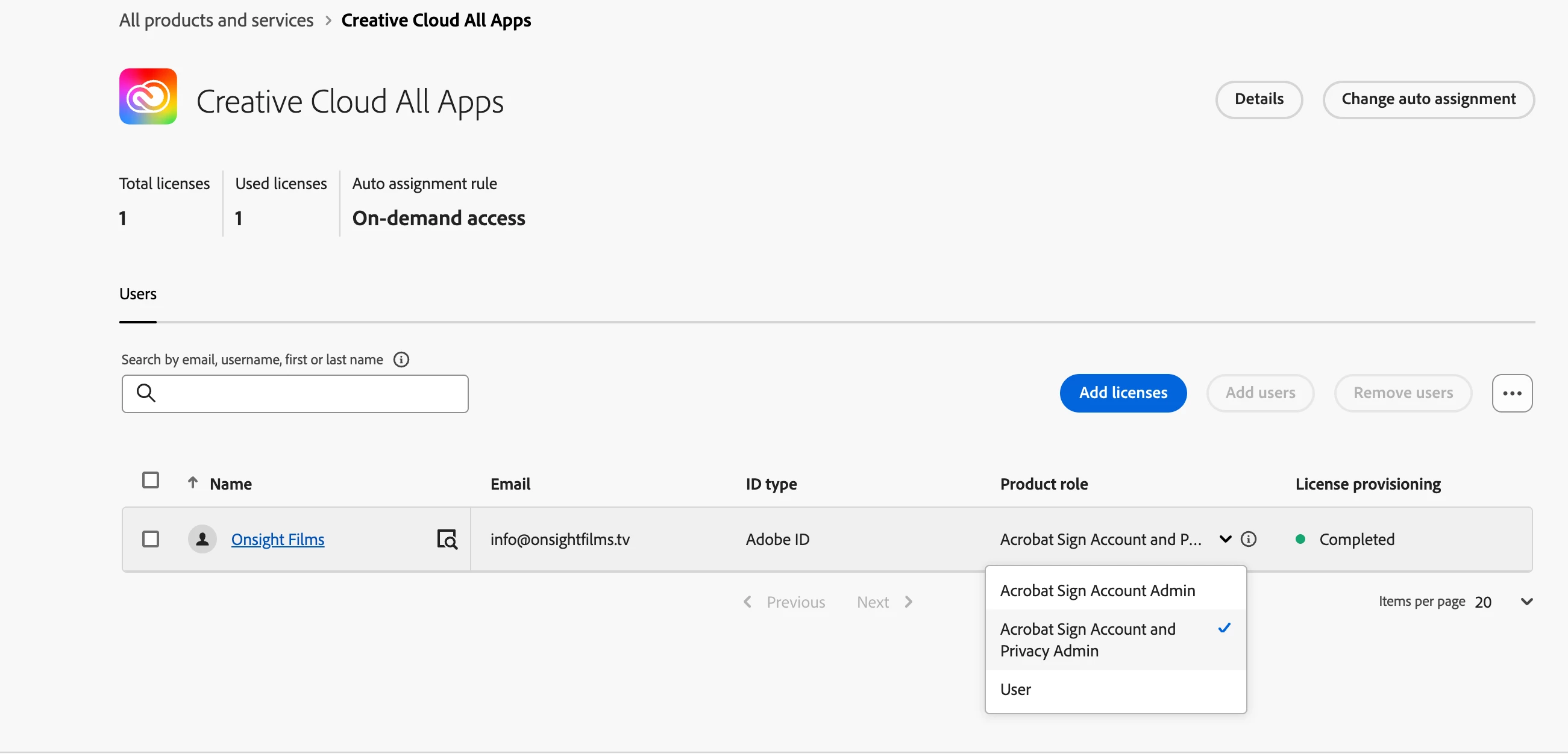
@gilh70430475 This is working for me now. I had to log into the Admin Console, click the "Products" tab along the top, then I selected "Creative Cloud", which took me to a page with all our CC users. From the list of users, I selected the drop down arrow to the right of my name and changed my product role from "User" to "Acrobat Sign Account and Privacy Admin" (screenshot attached). You can be admin but you'll still need to activate your Acrobat Sign Account Admin, which was throwing me off. Now when I'm signed into Adobe Acrobat and select "Settings" under my name in the top right corner, there's an Account Settings: Brand Settings that shows up on the left margin where I can upload a logo, and the E-Sign Branding shows up for me under the E-Sign dropdown. I hope that helps you.
@SallyCS Over 2 years later and this helped me! Thank you. I was with Adobe customer support and even had them log into remote access and they still couldn't figure out that this was all you needed to do 🙂 You should work for Adobe, because your explanation helped me in less than a min that their "tech support" did in over an hour!



 AdChoices