


Participant
March 2, 2018
Answered

Multiple pdfs for esign

  • March 2, 2018
  • 2 replies
  • 735 views

For some reason when I add multiple pdf pages, the signer is only seeing the one page that has the signature box.  The other pages are not showing.  After they sign, I go into Adobe eSign and I see all the pages I sent including the one they signed.  Is there a setting change or something we're doing wrong that is not allowing them to see the separate pages?  I swear that this worked fine in the past.

Thank you,

Confused
This topic has been closed for replies.
Correct answer ScottCarter

Greetings!

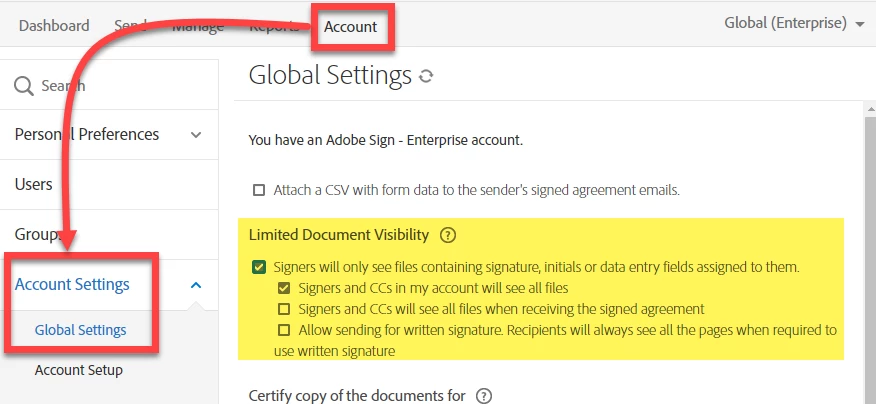
It sounds like your account has Limited Document Visibility enabled.

LDV selectively shows content to recipients based on which files have fields available for them.

IF you are only seeing the files that have fields applied, that's almost certainly the root cause.

LDV is enabled by Account admins at the account level.

It can be found by going to Account > Account Settings > Global Settings

2 replies

Participant
March 5, 2018

Perfect.  That was it.

Thank you so much!

ScottCarterCorrect answer
Participating Frequently
March 5, 2018

Greetings!

It sounds like your account has Limited Document Visibility enabled.

LDV selectively shows content to recipients based on which files have fields available for them.

IF you are only seeing the files that have fields applied, that's almost certainly the root cause.

LDV is enabled by Account admins at the account level.

It can be found by going to Account > Account Settings > Global Settings