matrixphoto
Participant
February 4, 2018
Answered

one email multiple signatures

  • February 4, 2018
  • 1 reply
  • 2766 views

Hi I have a contract for wedding photography that I send out , I need the couple to both sign it separately ,since they are not a legal entiti yet ,  but I only have one email address to work with .

Here is an example below ..

Contract Party 1 Signature: ___________________________________ Date: ____________________

Contract Party  2 Signature: ___________________________________ Date: ___________________

Photographers Signature: ___________________________________ Date: ___________________

T

Thank you for your help

Matrixphoto

This topic has been closed for replies.
Correct answer Meenakshi Negi

Hi Matrixphoto,

As you required two different signatures from a single email address you just need to assign the signer twice with the same email address.

On the send page, use the same email address in the recipient 1 and recipient 2 as a signer.

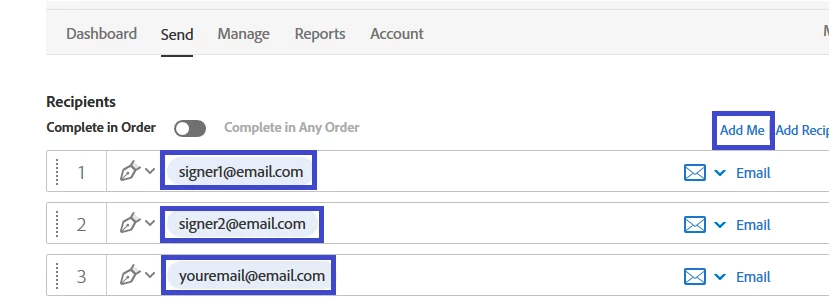
Then click on "Add Me" to add urself as the third signer. Check the screenshot below:

Use the same email address in singer 1 and signer 2 places in the screenshot.

In the third row, add your email address or click on "Add Me" option to automatically add your email address.

Make sure that you check the box for Preview & Add signature fields at bottom of the page, just above the send option.

You may also refer this help link Send to two signers who share one email address for detailed instructions.

Let us know if you have any question or need any help.

Regards,

Meenakshi

1 reply

Meenakshi Negi
Community Manager
Meenakshi NegiCommunity ManagerCorrect answer
Community Manager
February 5, 2018

Hi Matrixphoto,

As you required two different signatures from a single email address you just need to assign the signer twice with the same email address.

On the send page, use the same email address in the recipient 1 and recipient 2 as a signer.

Then click on "Add Me" to add urself as the third signer. Check the screenshot below:

Use the same email address in singer 1 and signer 2 places in the screenshot.

In the third row, add your email address or click on "Add Me" option to automatically add your email address.

Make sure that you check the box for Preview & Add signature fields at bottom of the page, just above the send option.

You may also refer this help link Send to two signers who share one email address for detailed instructions.

Let us know if you have any question or need any help.

Regards,

Meenakshi