


paulat81664930
Participant
August 2, 2018
Answered

One email - Two Signatures needed; User: Basic Individual Acct

  • August 2, 2018
  • 1 reply
  • 9304 views

I need to obtain two different signatures from individuals at the same email address. I have followed the posted video instructions but they are not producing a

signers@email.com

and

signers@email.com(1)

It only produces signers@email.com (color specified) and signers@email.com (different color specified); when I tested the document, one of my signature fields is missing. So two questions:

Is this even possible with my current subscription being set as a basic individual subscription? If yes, how to edit/enter the recipient email so the signers@email.com(1)  appears.

Thank you in advance for any info provided!
This topic has been closed for replies.
Correct answer MarjanA

Hi Paula,

Good question.

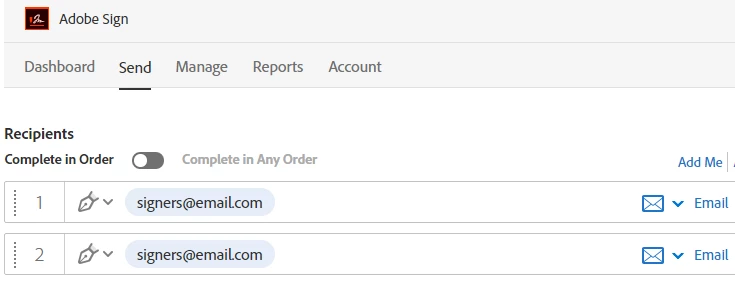
This is possible, but please note that you would need to also place the signers@email.com twice as a first and second signer. You should then be able to see two different signature boxes. But please note these wouldn't both appear at the same time.

You'd first receive one email with the document to signers@email.com with the first signature box showing. After this document is signed and completed, signers@email.com would receive a second email with the same document, but this time they would be able to see the second signature box to sign. For a video overview, please go to: Adobe Sign Help | Husband and wife scenario

Hope this helps!

Kind regards,

1 reply

MarjanACorrect answer
Participating Frequently
August 3, 2018

Hi Paula,

Good question.

This is possible, but please note that you would need to also place the signers@email.com twice as a first and second signer. You should then be able to see two different signature boxes. But please note these wouldn't both appear at the same time.

You'd first receive one email with the document to signers@email.com with the first signature box showing. After this document is signed and completed, signers@email.com would receive a second email with the same document, but this time they would be able to see the second signature box to sign. For a video overview, please go to: Adobe Sign Help | Husband and wife scenario

Hope this helps!

Kind regards,