
Participant
July 22, 2019
Answered

One signee for multiple documents, not condensing into a single document

  • July 22, 2019
  • 3 replies
  • 1227 views

Hello, 

I need to send multiple documents for signature, however when I add 5 documents in one request, the signed documents that are returned to me are in one condensed document rather than the 5 documents I added initially.  Is there a way to send only one request to a client and have my 5 documents returned separately? 

Thank you!
This topic has been closed for replies.
Correct answer Meenakshi_Negi

Hi Christinac,

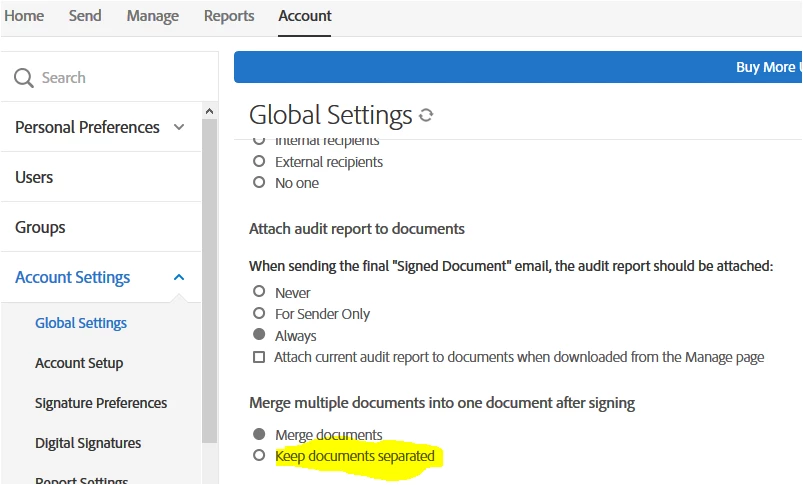
There is an option in Account settings "Keep document separated" which returns each document as a separate copy when you send multiple documents for signature at once.

However, the option is only available in the business and enterprise-level service plan.

I have checked that you are using the individual level Adobe Sign service.

This setting will not be available in your account.

Hope the information helps.

Regards,

Meenakshi

3 replies

Known Participant
July 6, 2022

There is also an option to download the original separate files when they have been signed and come back to you. On the web interface you need to expand the Actions menu:

Participant
June 7, 2021

Joseph Fennell


Joseph Fennell
Meenakshi_Negi
Meenakshi_NegiCorrect answer
Legend
July 23, 2019

Hi Christinac,

There is an option in Account settings "Keep document separated" which returns each document as a separate copy when you send multiple documents for signature at once.

However, the option is only available in the business and enterprise-level service plan.

I have checked that you are using the individual level Adobe Sign service.

This setting will not be available in your account.

Hope the information helps.

Regards,

Meenakshi