Participant
October 11, 2021
Answered

Participant order in Microsoft Power Automate

  • October 11, 2021
  • 1 reply
  • 2042 views

Hi all,


I am working on a flow which would send a policy document to department members to sign.

My issue is how can I set order where document requires to be sent everyone at the same time to sign. No of members can be anywhere between 5 to 20.


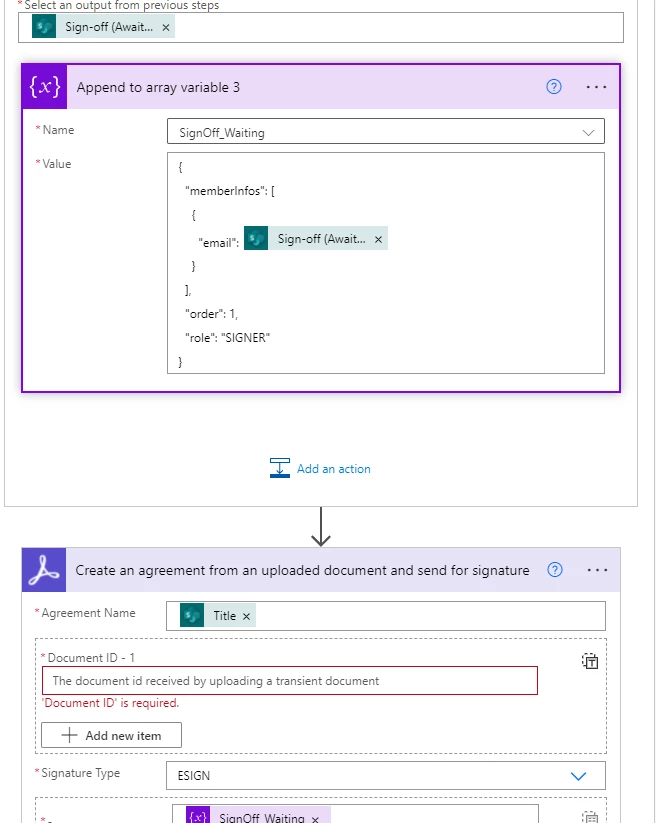
Here is screenshot of my flow.


Thank you in advance.


This topic has been closed for replies.
Correct answer SimonESATS

With that in mind i think you're heading in the right direction looking at your screenshots. 

You are using the action "Create an agreement from an uploaded document and send for signature"

this expects the documentID from another Sign action "Upload a document and get a document ID"

That step requires some file content wich can come from a Sharepoint Library or OneDrive.

The file/document should be quite straight forward.


What is a bit more tricky is to accomodate all your signers, though it looks like you have that sorted. The property which determines the signing order is in the participant json. In your screenshot it's "order":1,


As you want all signer to receive the agreement at the same time, just leave this to 1 

This json is documented as part of the Rest api here 

post /agreements


overall the end goal is to end up with a variable containing json like below. This is an array of participants. Below shows 2 sets, in your case yo'd have 5-20 sets in this array.


[
{
    "memberInfos": [
      {
        "email": email1
      }
    ],
    "order": 1,
    "role": "SIGNER"
  },
{
    "memberInfos": [
      {
        "email": email2
      }
    ],
    "order": 1,
    "role": "SIGNER"
  }
]



1 reply

Adobe Employee
October 11, 2021

You are using the same documentID for all participants. But what is the expected outcome here. Do you want everyone to sign the same agreement resulting in a single signed PDF with 5-20 signatures.

Or do you expect to get back 5-20 individual signed PDF files?


The former is a single Sign transaction, the latter requires 5-20 Sign transactions and is more like a batch agreement creation process.


dkanojiaAuthor
Participant
October 11, 2021

Hi Simon,


Thank you for your reply.

I want all participants to sign the same agreement in single signed PDF with 5-20 signature; resulting in to one single Sign transaction.


Many thanks.

SimonESATSCorrect answer
Adobe Employee
October 12, 2021

With that in mind i think you're heading in the right direction looking at your screenshots. 

You are using the action "Create an agreement from an uploaded document and send for signature"

this expects the documentID from another Sign action "Upload a document and get a document ID"

That step requires some file content wich can come from a Sharepoint Library or OneDrive.

The file/document should be quite straight forward.


What is a bit more tricky is to accomodate all your signers, though it looks like you have that sorted. The property which determines the signing order is in the participant json. In your screenshot it's "order":1,


As you want all signer to receive the agreement at the same time, just leave this to 1 

This json is documented as part of the Rest api here 

post /agreements


overall the end goal is to end up with a variable containing json like below. This is an array of participants. Below shows 2 sets, in your case yo'd have 5-20 sets in this array.


[
{
    "memberInfos": [
      {
        "email": email1
      }
    ],
    "order": 1,
    "role": "SIGNER"
  },
{
    "memberInfos": [
      {
        "email": email2
      }
    ],
    "order": 1,
    "role": "SIGNER"
  }
]