
Participant
March 8, 2023
Answered

Power Automate - Template with 2 participants error "Recipient set is not enabled"

  • March 8, 2023
  • 2 replies
  • 1657 views
Hi all,
Using the flow "Create an agreement from a library template and send it for signature" on Microsoft Power Automate. 
My template has 2 participants that are required to sign, and when I run the flow I get the following error message:
 
{
  "code""BAD_REQUEST",
  "message""Recipient set is not enabled"
}
 
There is something wrong with my flow when I set the participants, so keen to understand how we configure the flow for multiple participants.
 
 
This topic has been closed for replies.
Correct answer _MrPat_

Found what the problem was. 

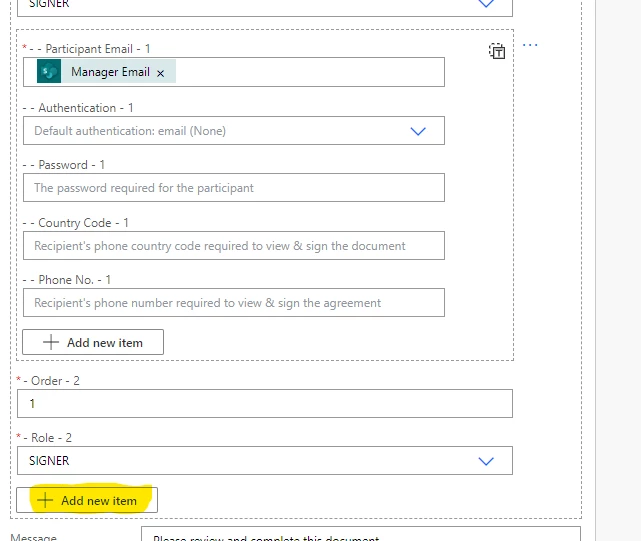
When you setup the flow, there are two areas where you can "add more". You need to add the other participant at the bottom so you can also set the Order and Role:


2 replies

Participant
July 27, 2023

Hi,

I'm having a similar issue. I got everything working with the second particpant set as an approver, but it sends the approval to the same email address as the first participant. The second participant is always going to be the same person, so I've just typed that in. That's the only thing I can think makes a difference, but I've been told you should be able to just type it in.

Any ideas?

Meenakshi_Negi
Legend
July 31, 2023

Hi RL30901927w29x,


Thank you for reaching out.


It seems that you are using the Adobe Sign Enterprise plan. If you have an integration-related question, the experts can best answer it. I suggest you, please get in touch with our Adobe Sign Enterprise support team to get the correct information about this. You may contact them using the steps in the following help document: https://helpx.adobe.com/sign/using/adobesign-support-resources.html.

For more information on Power Automate integration, refer to the following document: https://helpx.adobe.com/sign/integrations/microsoft-powerapps-flow.html


Thanks,

Meenakshi

_MrPat_AuthorCorrect answer
Participant
March 9, 2023

Found what the problem was. 

When you setup the flow, there are two areas where you can "add more". You need to add the other participant at the bottom so you can also set the Order and Role: