
Participant
April 26, 2024
Question

PowerAutomate "Get a pdf of a signed agreement" > PDF is password protected

  • April 26, 2024
  • 2 replies
  • 1508 views

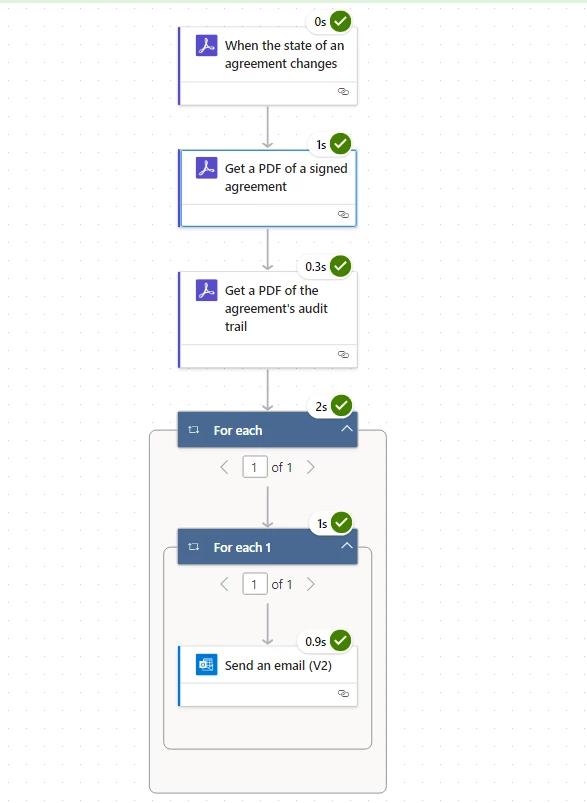
Hello, i have created a PowerAutomate flow to automatically send me an email with the signed agreement PDF as an attachment upon workflow completion. 


The flow run fine, but for some reason the PDF in the email is password protected.  


i need the PDF not password protected....help...


On the other hand, is there another way to automatically email/download/save the signed PDF without using PowerAutomate?  i tried going into Adobe sign workflow but it is not working for me...
Thank you for your help

2 replies

Participant
September 25, 2025

i have exactly the same problme, is there meanwhile a solution?
Where can i find the password?

Meenakshi Negi
Community Manager
Community Manager
September 25, 2025

Hi fabian_3765,


Thank you for reaching out, and sorry about the trouble caused.


We have checked that you are using the Adobe Sign Enterprise plan. As you have a Power Automate-related question, the experts can best answer it. Please contact our Adobe Sign Enterprise support team for the correct information. You may contact them using the steps in the following help document: https://adobe.ly/42aw3mR.

Refer to the following help document for more information on Acrobat Sign Integration: https://adobe.ly/42f8UQi


Thanks,

Meenakshi

mariahweyne
Inspiring
April 29, 2024

Documents will always be protected when signed with Adobe Sign.  No way to "un protect" them.

Participant
April 29, 2024

Thanks for responding.  i should clarify.  i understand it is protected to prevent editing.  however, it is asking for a password to open the PDF file.  and i don't even know what the password is.


i need to be able to open the PDF file as-is, without any password

mariahweyne
Inspiring
April 29, 2024

Not possible.  The passoword is set by Adobe exactly for security and legal purposes.