
kf26129861
Participant
June 9, 2025
Answered

Prefilled required field contents not displaying

  • June 9, 2025
  • 2 replies
  • 641 views

Prefilled required field entered but not displaying to signers. I have verified the field was entered via 'Download form field data' but when I open the agreement the field appears blank. All my other prefilled fields display fine.


Field properties: no conditions
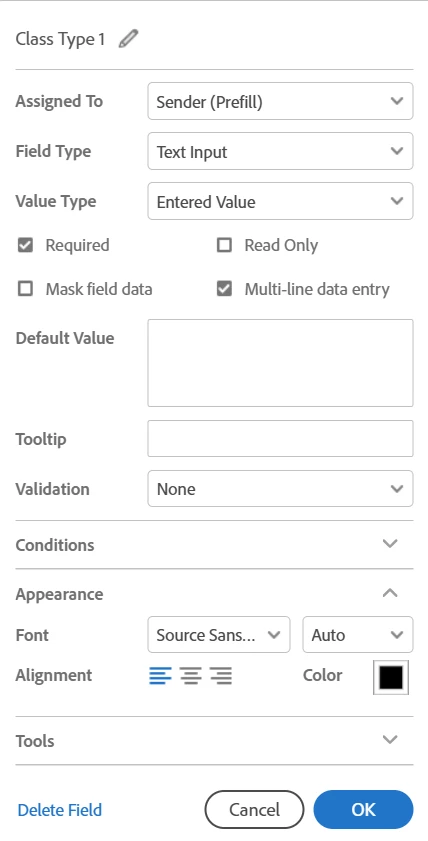
I have used this setup many times & this is first time experiencing this. I believe the field was displaying as recently as a couple of days ago as my 1st signers did not notice anything amiss. Even one of my recently completed agreements now shows the field as blank. I have a number of agreements in progress with the same issue. Has a change been implemented recently??


Correct answer kf26129861

After working with a couple of Adobe support techs over the phone, ended up having to cancel all of the agreements in progress that weren't displaying the field. Tech took logs and other artifacts. Couldn't resolve why the data fields downloaded the data input but weren't displaying. Possibly due to the web application interface upgrade that is in progress(?). 

2 replies

nvrlift
Participant
September 29, 2025

I'm having this exact issue.  Randomly started a few weeks ago, but when the docuemnt goes out for signature, it shows filled in fields on page 1, but no subsequent pages.  Only the online version.  The attached PDF that goes out with the Adobe Sign email is fine, but the onine version is blank when we ask a customer to sign.  Very frustrating.

Meenakshi Negi
Community Manager
Community Manager
September 29, 2025

Hi nvrlift,


Thank you for reaching out, and sorry about the trouble caused.


Please share the screen recording of how the document appears when you try to send it for signature. It will help us understand your workflow and where the issue occurs. 


Let us know if you need any help.


Thanks,

Meenakshi

kf26129861
Participant
June 9, 2025

After some further trial & error, if I add a default value to the field that does display on new agreements BUT any text entered after the default value in the same field does not. I'm perplexed.

Meenakshi Negi
Community Manager
Community Manager
June 10, 2025

Hi kf26129861,


Thank you for reaching out, and sorry about the trouble.


Please let us know how you are prefilling the document. Could you share the complete steps you use to fill out and send the document? Are you using the desktop application or the web to send a document for signature?


It would be helpful if you could share the screen recording of the steps used. You may create a test document and use the same steps. 


Feel free to let us know if you need any help.


Thanks,

Meenakshi