The QA Department
Participant
April 24, 2026
Answered

Printing electronically signed documents leaves the signature line blank. Maybe there is a reason to sometimes do that (?). How do I get it to actually print the signature?

  • April 24, 2026
  • 2 replies
  • 43 views

It is important to have signed paper copies of a document, but Adobe won’t print electronic signatures.  If that is a feature, how do I turn it off?

    Correct answer Meenakshi0101

    Hi The QA Department,


    Thank you for reaching out.


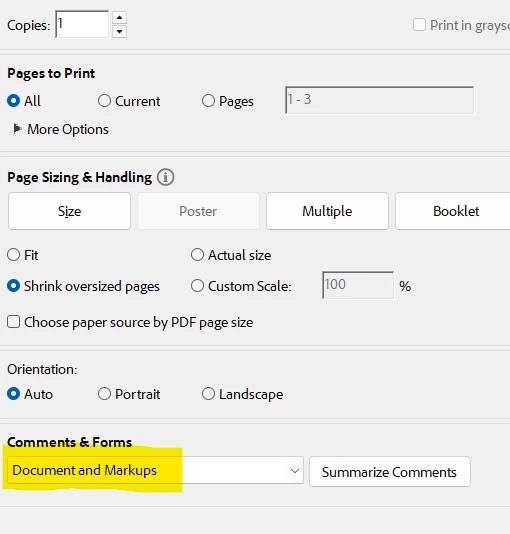
    When printing the signed PDF, in the print window, select “Document and markups” from the “Comments & Forms” drop-down. Then try to print. Please check the screenshot below:


    Let us know how it goes.


    Thanks,

    Meenakshi 

    2 replies

    The QA Department
    Participant
    April 27, 2026

    Meenakshi,

    Thank you, that solved the printing problem.  I think the program should be clear that the “document” includes whatever markups the other person put on it.  When anyone makes a change, the original document is no longer “the document.”  So the pull-down menu choices should be “document” and “document without markups or whatever.”  I know adobe put some effort into controlling changes to documents, but many people I deal with use whatever app their phone has to do things sloppily, and I have to deal with it.

    Meenakshi0101
    Community Manager
    Community Manager
    April 27, 2026

    Hi The QA Department,,


    Glad to know that the ussgestion helped. Thank you for updating us and sharing the feedback. 

    You may always share your suggestion with the product team via this page: https://www.adobe.com/products/wishform.html.


    Let us know if we can be of any help.


    Thanks,

    Meenakshi

    Meenakshi0101
    Community Manager
    Meenakshi0101Community ManagerCorrect answer
    Community Manager
    April 27, 2026

    Hi The QA Department,


    Thank you for reaching out.


    When printing the signed PDF, in the print window, select “Document and markups” from the “Comments & Forms” drop-down. Then try to print. Please check the screenshot below:


    Let us know how it goes.


    Thanks,

    Meenakshi