


Participant
August 12, 2025
Answered

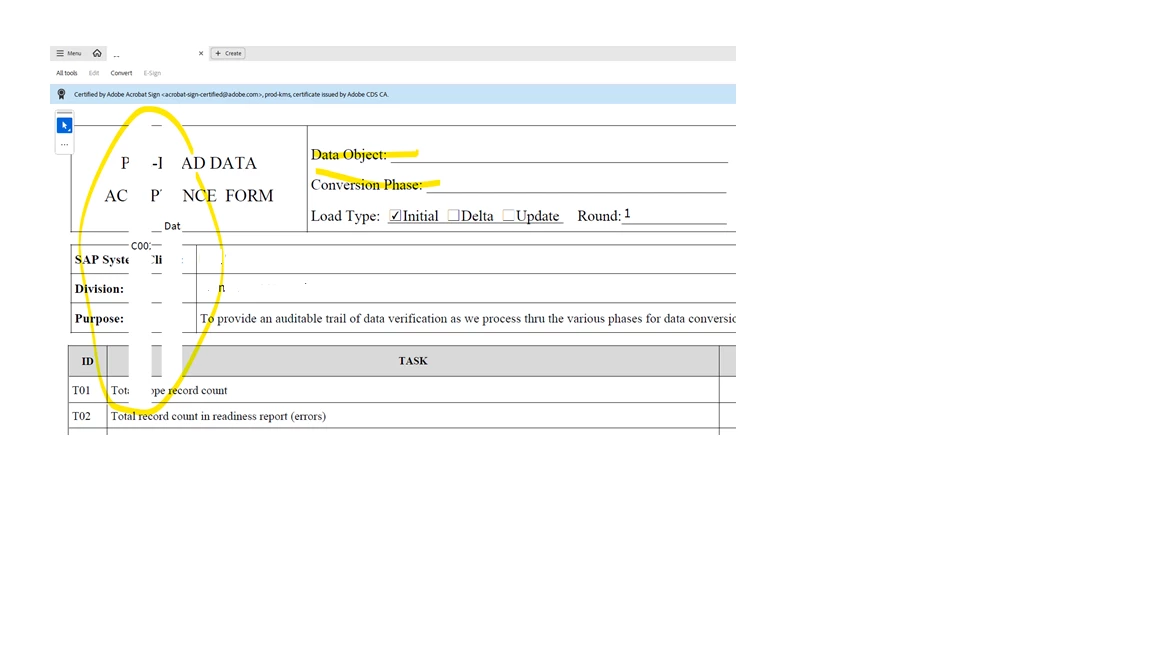
Problem with Adobe Sign - Text Box getting shifted when uploading the pdf in Adobe web
  • August 12, 2025
  • 1 reply
  • 295 views

The text box shows correctly while editing the form in the offline version. But after uploading the form to route for signatures, it distorts and moves the text around the page making it difficult to read.


Correct answer iti_4768

Hi iti_4768,


Thank you for the information.


If the issue occurs with this particular document, please share the form with us.

Also, could you share the steps you use to add the form fields?


Thanks,

Meenakshi


The issue was with all the documents. We raised a case with Adobe and they fixed it in our environment. Some changes were made in the PDF processing method in Adobe webforms as part of one of their releases which was causing this issue. Its resolved now.

1 reply

Community Manager
August 12, 2025

Hi @iti_4768


Thanks for reaching out, and sorry for the troubled experience. 

When you are editing the file or form in Adobe Acrobat, use the "Prepare a form" tool. Ensure "Prepare form for e-signing" is checked. 


Let us know how it works.


Best regards,
Tariq | Adobe Community Team

iti_4768Author
Participant
August 12, 2025

Hi Tariq,

I tried this setting but still getting the distorted form after uploading in Adobe DC web - Publish a web form option(Adobe Sign).


Meenakshi Negi
Community Manager
Community Manager
August 12, 2025

Hi iti_4768,


Thank you for the information.


If the issue occurs with this particular document, please share the form with us.

Also, could you share the steps you use to add the form fields?


Thanks,

Meenakshi