Answered
Profile Changes
Hi how can I change my Adobe SIgn profile name?

Hi how can I change my Adobe SIgn profile name?
Hi HrInfolob,
Sorry for the delay in response.
To change your Adobe Sign profile name, refer to the steps provided below:
- Log in to your Adobe Sign account
- Click your Name value that appears in the upper right corner.
- Select My Profile.
- Click on Edit tab provided on My Profile page.
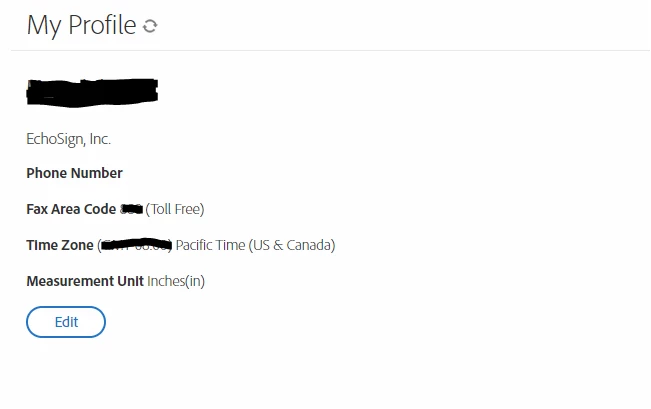
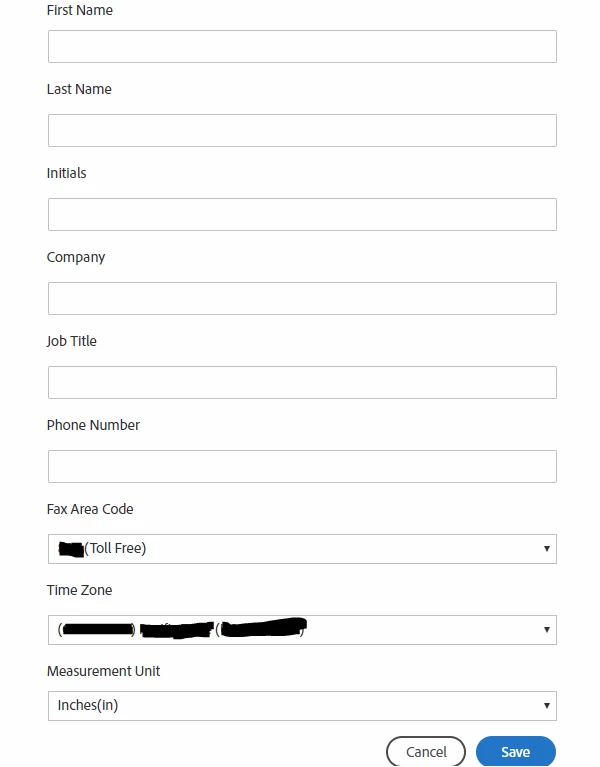
- In the Edit window, change the Name as you required.
- Then click on Save at the bottom of Edit window.
If you are using an Adobe ID to Sign-in to your Adobe Sign account, use the steps mentioned here Change name for an Adobe Sign Profile when using an Adobe ID to log in to change the profile name.
Hope the information provided above helps.
Let us know if you experience any issue or need any help.
Regards,
Meenakshi
Already have an account? Login
Enter your E-mail address. We'll send you an e-mail with instructions to reset your password.


 AdChoices