Greetings!
Conditional fields are available with the Enterprise level of service and will allow you to make a field available (visible) based on the values entered (or selected) in other fields.
Conditions are part of the field properties.
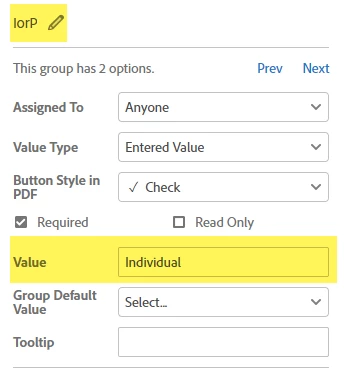
So in the example below, I have created a radio button pair with the field name "IorP"
I have set the Value property in the radio buttons to show Individual or Partner (so I can easily select the correct condition). Each radio button must have a unique Value property (to differentiate them).
Then, in the signature field, set the Conditions value to only show the field when the correct radio button option is selected. In this example, the signature field will only Show when IorP = Partner.
A different signature field can be created to show only if IorP = Individual.





 AdChoices