


marceld91362671
Participant
June 12, 2018
Answered

Radio Button text tag with default option

  • June 12, 2018
  • 1 reply
  • 1911 views

I'm using the radio buttons, so that my signer must 'choose only one' option. But to help him, I want one of the options to be default. But... how???

For checkbox you have the checkbox(checked), but i can't find a solution for the radio buttons.

Is it possible that a grouped set of options have a default value.
This topic has been closed for replies.
Correct answer ScottCarter

Greetings!
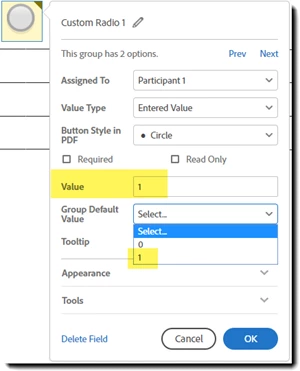
If you are using the drag and drop environment to build your forms, the option to define the default is a drop down that identifies the default value based on the individual value of the radio button:

Text tags will look something like this:

{{(Red)Color_es_:signer1:label(“Red”)}}

{{(Blue)Color_es_:signer1:label(“Blue”)}}

{{(Green)Color_es_:signer1:label(“Green”):default("Green")}}

Within the tag, you provide the :default directive, and then use the label to identify the specific element

1 reply

ScottCarterCorrect answer
Participating Frequently
June 12, 2018

Greetings!
If you are using the drag and drop environment to build your forms, the option to define the default is a drop down that identifies the default value based on the individual value of the radio button:

Text tags will look something like this:

{{(Red)Color_es_:signer1:label(“Red”)}}

{{(Blue)Color_es_:signer1:label(“Blue”)}}

{{(Green)Color_es_:signer1:label(“Green”):default("Green")}}

Within the tag, you provide the :default directive, and then use the label to identify the specific element

marceld91362671
Participant
June 12, 2018

The 'text tags' solutions was what I was looking for!

It works! With a small adjustment: it's not the label that you use with the :default directive, but the value that you use

In other words: {{(Gr)Color_es_:signer1:label("Green"):default("Gr")}} works perfect.

Thanks!!!!