karenc49189650
Participant
February 14, 2018
Answered

Re: How to sign document YOURSELF before sending to recipient??

  • February 14, 2018
  • 1 reply
  • 495 views

I have a document in my library - with the areas ready for my client to fill out and sign - but where can I add my own signature?

I need to sign this first - or permanently and keep in my library as I use it over and over.

thank you!

    This topic has been closed for replies.
    Correct answer Meenakshi_Negi

    Hi Karenc,

    As you have the document in the library, just go to Manage tab and select Library.

    Then select the document and there you will find an option to "send | edit" in blue.
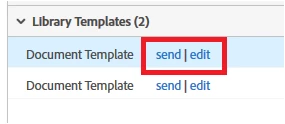
    As you need to send the document with your signature, click on "send".

    Then on the Send page, add your email first in the "Enter recipient email" or you can simply click on "Add me" option. It will add your email address automatically.
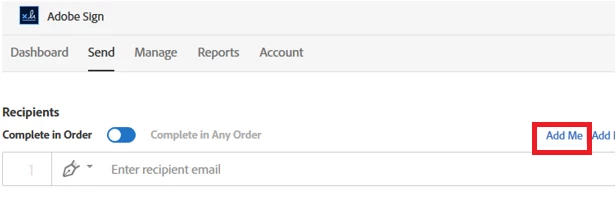
    Then add the client email address in the next field.

    Make sure that radio button for "Complete in Order' is selected.

    Then at the bottom check the box for "Preview & Add Signature fields" and click on Send.
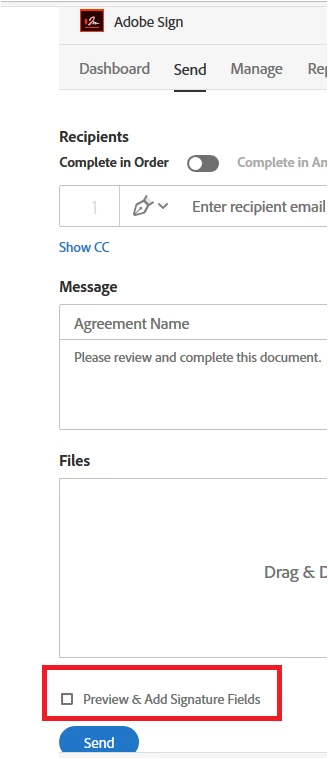
    On the preview page, you can add the signature field to add your signature.

    Make sure that you assign the form fields to the recipients that need to be filled by them.

    Refer the steps provided in help document on Assign form fields to recipients

    Once done, click on "Sign, then Send" at the bottom left in the blue box.
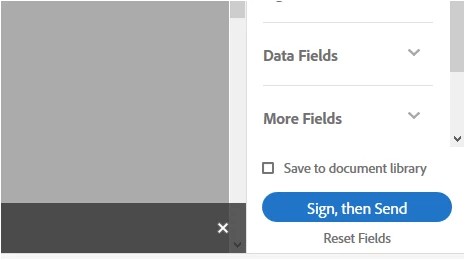
    Then you can sign the document first and then it will forward to next recipient.

    Check if this is what you are looking for.

    Let us know if you need any help.

    Regards,

    Meenakshi

    1 reply

    Meenakshi_Negi
    Meenakshi_NegiCorrect answer
    Legend
    February 15, 2018

    Hi Karenc,

    As you have the document in the library, just go to Manage tab and select Library.

    Then select the document and there you will find an option to "send | edit" in blue.

    As you need to send the document with your signature, click on "send".

    Then on the Send page, add your email first in the "Enter recipient email" or you can simply click on "Add me" option. It will add your email address automatically.

    Then add the client email address in the next field.

    Make sure that radio button for "Complete in Order' is selected.

    Then at the bottom check the box for "Preview & Add Signature fields" and click on Send.

    On the preview page, you can add the signature field to add your signature.

    Make sure that you assign the form fields to the recipients that need to be filled by them.

    Refer the steps provided in help document on Assign form fields to recipients

    Once done, click on "Sign, then Send" at the bottom left in the blue box.

    Then you can sign the document first and then it will forward to next recipient.

    Check if this is what you are looking for.

    Let us know if you need any help.

    Regards,

    Meenakshi


