
Participant
September 27, 2023
Question

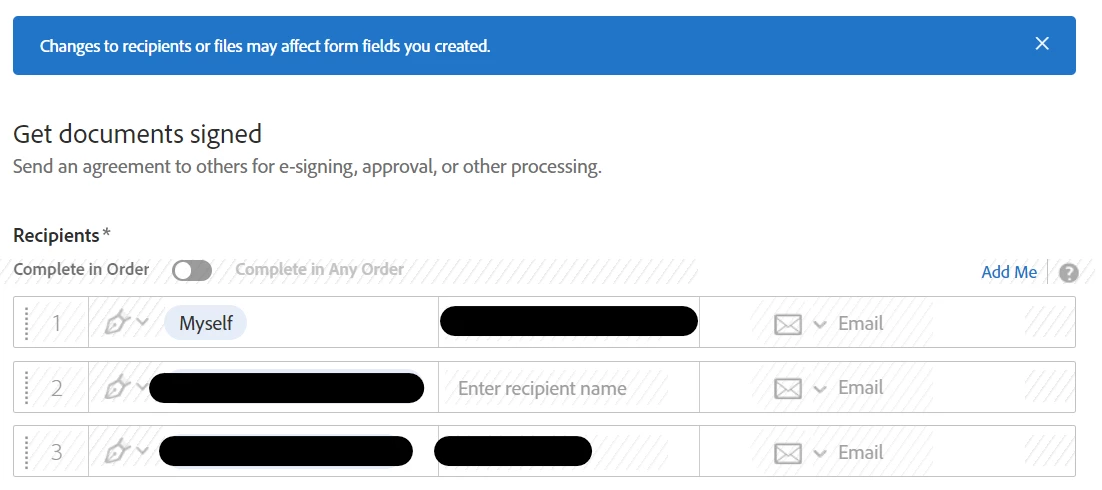
Recipients greyed out in draft agreement

  • September 27, 2023
  • 1 reply
  • 1043 views

Hi - I created an Adobe Sign document. Once I had completed the recipients, I went to the next page to capture the fields where people must sign. I then realised that I had left someone out, and so saved the document as a draft. If I select the document from the agreements page and select edit, I cannot add a recipient as the fields are greyed out, which means that I would have to delete the agreement and start from scratch, which is highly annoying. How do I add a recipient to a draft document?
This topic has been closed for replies.

1 reply

mariahweyne
Inspiring
September 27, 2023

Once you hit the sned button you cannot anymore receipients.  Need to start over.

Participant
August 15, 2024

No I have the same problem.  You HAVE NOT sent the document out for signature only saved a draft and now you want to come back to it because you forgot to add someone before sending out.  How do you do that without starting all over again with a new one?  THis shoudl be a pretty easy function as it is very common place to add someone after you've placed the other 10 people in the draft for example, adding an 11th person.

mariahweyne
Inspiring
August 15, 2024

You cannot.  Once you hit preview or saved a draft there's only few things you can change. 

Modify the files of a sent agreement (adobe.com)