
Participant
September 18, 2023
Answered

Request e-signatures gets stuck when uploading document

  • September 18, 2023
  • 2 replies
  • 13662 views

Good morning, 


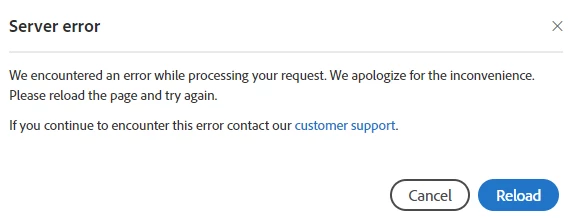
Suddenly, "Request e-signatures" is having issues. When I click so that it uploads the document, it tells me "Server Error. If it persists, contact customer support".


Could you please help?


This topic has been closed for replies.
Correct answer mariahweyne

You can try by "cleaning" you account.  Go to Adobe Account and scroll down to active seeions and end all sessions.  Sign out and sign back in Adobe Acrobat Sign Login — Sign in to your e-signature account (adobesign.com).

2 replies

mariahweyne
mariahweyneCorrect answer
Inspiring
September 19, 2023

You can try by "cleaning" you account.  Go to Adobe Account and scroll down to active seeions and end all sessions.  Sign out and sign back in Adobe Acrobat Sign Login — Sign in to your e-signature account (adobesign.com).

Participant
March 14, 2024

That did not work for me. Still unable to connect to Adobe Cloud Storage.


Actual message: Unable to Connect to Server
It's taking longer to connect than usual. You can save your agreement as draft and try again later or keep checking the status of the agreement under the agreements tab in the home page.


This happens quite often for me. Sometimes I have had to uninstall and reinstall to get this to work. That is a huge pain. BTW, it never shows up in the agreements tab so it isn't even getting that far.

mariahweyne
Inspiring
March 20, 2024

https://acrobat.adobe.com/link/documents/files/ and check the left hand menu - click drafts - you should be able to complete it from there.

Participant
September 19, 2023

I am having the same issue!