
Participant
March 10, 2025
Question

"Request e-signatures" using name attached to credit card as sender, not the account name

  • March 10, 2025
  • 1 reply
  • 595 views

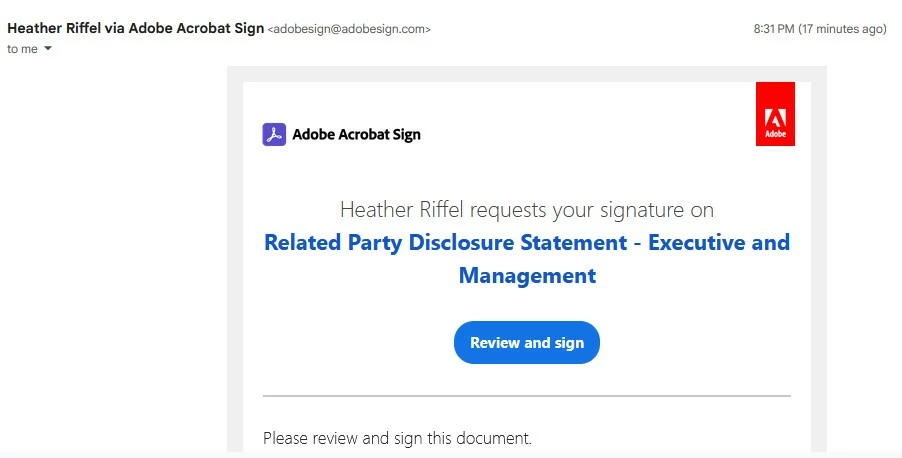
The "Request e-signatures" feature is sending e-signature requests using the name attached to the credit card as the sender, not the name attached to the account.


I have changed every instance of the name that I can find (Profile Name, Account Name) to the correct name, "Greg Morgan", including changing the credit card information, but all of the signature requests are still being sent by "Heather Riffel" (image attached).


Any insight would be greatly appreciated - thank you very much!
1 reply

Meenakshi_Negi
Legend
March 10, 2025

Hi Greg7772,


Thank you for reaching out.


We have checked your account. The names on the Adobe account and Acrobat Sign account are different. Please use the following steps to change the account name in the Acrobat Sign profile.


- Open the Acrobat Web account: https://adobe.ly/4ibP8Li

- Sign in with your Adobe credentials (Adobe ID and password).

- Click on the Profile icon at the top right corner and select settings.

- In the settings window, scroll down to E-signing settings and click Edit settings.

- A new window will open. Click on Personal Preferences on the left and then My Profile.

- Click on edit profile and change the name.

- Click on the Save button to save the changes.


Let us know how it goes.


Thanks,

Meenakshi


Greg7772Author
Participant
March 13, 2025
Thanks for the quick reply Meenakshi!

While I am able to get to the personal preferences and My Profile, I am
unable to edit the name (see Photo 1). When I click on "Edit Name", a new
window opens that takes me back to my public profile, which has already
been updated to Greg Morgan.

Any further insight that you can provide would be gratefully received.

Greg
Greg7772Author
Participant
March 18, 2025

Thanks for the quick reply Meenakshi!


While I am able to get to the personal preferences and My Profile, I am
unable to edit the name (see Photo 1). When I click on "Edit Name", a new
window opens that takes me back to my public profile, which has already
been updated to Greg Morgan (see Photo 2).


Any further insight that you can provide would be gratefully received.


Thanks again!


Greg