
Participant
September 7, 2023
Question

Requiring only a certain number of signatures

  • September 7, 2023
  • 1 reply
  • 461 views

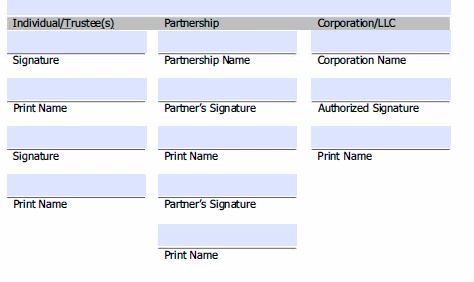
We are attempting to send out our credit applications via adobe acrobat sign. We have all the fields entered in on the form to be auto filled, but have run into issues with our last page. On that page we have for Individuals (which must be signed by an officer or owner of the company, unless we are dealing with a cooperative), another grouping for partnership (which 2 of those signatures would be required then) or a corporation/llc (for officer or owner to sign). When we send this, we would have to know ahead of time what the business set up is & then change it each time to only require those needed signature spots. Is there a way to change this so that it would require them to sign, but for the potential customer to choose which spots they would need to sign? 


This topic has been closed for replies.

1 reply

Meenakshi Negi
Community Manager
Community Manager
September 30, 2023

Hi Lacy31220708of30,


Thank you for reaching out, and sorry about the delay in response.


If you are referring that you do not have the information about who will be signing the document from each of the group, you may add the recipeitn group in that case. Then the required person from the groups will sign it. For more information, refer to the following help document: https://helpx.adobe.com/sign/kb/add-recipient-groups-adobe-sign.html


If that is not the case, and you mean that only one of these needs to be signed, then you may try the Workflow for that. You may get more information on Acrobat Sign Workflow on the following document: https://helpx.adobe.com/sign/using/workflow-designer-signature-workflow.html. Check if that helps.


If you are referring to something else, share more information.


Thanks,

Meenakshi