Daleohill
Participant
April 20, 2018
Answered

Saving as a draft and editing

  • April 20, 2018
  • 3 replies
  • 6771 views

I'm working on documents that I will send out for signature, but I'm not ready to send them out.  I'd like to be able to add fields to be filled out and signed and save as a draft and come back and edit it.  I don't see a "button" to save the document and we I leave the Send section I receive a message says changes may be lost.  There are clearly Drafts, but it looks like I cannot save field I add to the document, and I'm not clear if there is a way to edit the text of the message in draft before sending.  I can't find any documentation on this.

Thanks,

Dale
    Correct answer Adorobat

    Hi Dale,

    You may try saving document to document library and see if that works for you. Try following steps:

    1- Open the document in Adobe sign >  enter recipient mail (using a known "black hole" email address in the recipient place is a good idea as the agreement will be sent).

    2- Type message > add files > click Preview & add signatures fields > next

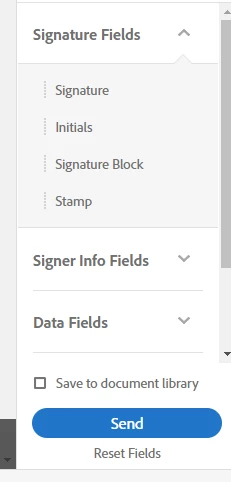
    3- Add the fields on the pdf > check the box next to "save to document library" in the right hand pane (below is the screenshot).

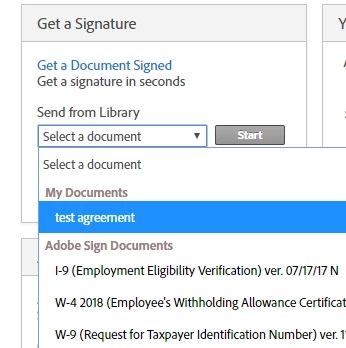
    You can then select that document from library.

    You may also visit the following link discussing similar workflow:

    Thank You,

    Shivam

    3 replies

    Participant
    August 19, 2022

    He eliminado toda relación con Uds. (mails, direcciones, etc.) , agradecería procediesen a cancelar cualquier información mía en sus archivos.


    Gracias.

    Meenakshi_Negi
    Legend
    May 16, 2018

    Hi Dale,

    Regarding the changes in the text message while sending, sorry to say there is no way to edit the text message once you leave the Send page and move to "Preview" page.

    You may try creating templates as mentioned above by Adorobat.

    Check if that works for you.

    Let us know if you need any help.

    Regards,

    Meenakshi

    Adorobat
    AdorobatCorrect answer
    Participating Frequently
    April 25, 2018

    Hi Dale,

    You may try saving document to document library and see if that works for you. Try following steps:

    1- Open the document in Adobe sign >  enter recipient mail (using a known "black hole" email address in the recipient place is a good idea as the agreement will be sent).

    2- Type message > add files > click Preview & add signatures fields > next

    3- Add the fields on the pdf > check the box next to "save to document library" in the right hand pane (below is the screenshot).

    You can then select that document from library.

    You may also visit the following link discussing similar workflow:

    Thank You,

    Shivam

    Participant
    April 21, 2022

    Adobe needs to change this feature.  A draft should save automatically like DocuSign does.  Also, adding recipients then clicking 'next', we should be able to go back and add additional recipients since the document was never 'sent'.

    Participant
    August 19, 2022

    Agreed!  This is very frustrating that one cannot swap out a document, nor aprpover, nor signatories, while agreement is in Draft status.  It should be flexible until sent.