victorp51984706
Participant
June 26, 2018
Answered

second signature

  • June 26, 2018
  • 1 reply
  • 1932 views

hi there,

i sent the document for two signatures. the first one already singed, but the second did not get the email with the link. i have sent a remainder, but still he did not get the email.

can somebody explain why? please?

    This topic has been closed for replies.
    Correct answer MarjanA

    Hi Victor,

    If the recipient can't find the email in this folder, they can also access the Adobe Sign Document through an alternative method with a weblink and Access Code through an alternative signing method. For this to work, you'd need to have the document access code enabled in your Account.

    If you go to the Manage tab > click on the agreement that is out for signature > you should see a small box on the top right-hand corner of your screen with a 'print' 'enlarge' 'PDF' and 'Cancel' button on top. Scroll down in this box to reveal the access code.
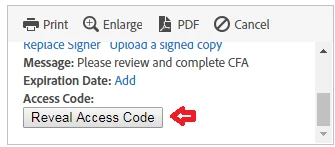
    If you've found the access code, simply email this to the recipient of the document along with the following URL link: https://echosign.com/esign

    The recipients imply copies their email and access code in this link to open and eSign the agreement.

    If the Access Code isn't available, simply email support@echosign.com to enable this setting for your account.

    Hope this helps

    Kind regards,

    1 reply

    MichaelKazlow
    Legend
    June 27, 2018

    Have them check their junk/spam folder. You should check there is not an error in the email address.

    victorp51984706
    Participant
    June 27, 2018

    Thanks Michael,

    i have done that, but still there is not trail of the emails sent by adobe.

    MarjanACorrect answer
    Participating Frequently
    June 27, 2018

    Hi Victor,

    If the recipient can't find the email in this folder, they can also access the Adobe Sign Document through an alternative method with a weblink and Access Code through an alternative signing method. For this to work, you'd need to have the document access code enabled in your Account.

    If you go to the Manage tab > click on the agreement that is out for signature > you should see a small box on the top right-hand corner of your screen with a 'print' 'enlarge' 'PDF' and 'Cancel' button on top. Scroll down in this box to reveal the access code.

    If you've found the access code, simply email this to the recipient of the document along with the following URL link: https://echosign.com/esign

    The recipients imply copies their email and access code in this link to open and eSign the agreement.

    If the Access Code isn't available, simply email support@echosign.com to enable this setting for your account.

    Hope this helps

    Kind regards,

